<?xml version="1.0" encoding="utf-8"?>
<feed xmlns="http://www.w3.org/2005/Atom" xml:lang="en">
    <title>deliberate.codes</title>
    <link rel="self" type="application/atom+xml" href="https://deliberate.codes/atom.xml"/>
    <link rel="alternate" type="text/html" href="https://deliberate.codes"/>
    <generator uri="https://www.getzola.org/">Zola</generator>
    <updated>2026-05-07T00:00:00+00:00</updated>
    <id>https://deliberate.codes/atom.xml</id>
    <icon>https:&#x2F;&#x2F;deliberate.codes/favicon.svg</icon>
    <author>
        <name>deliberate.codes</name>
        <uri>https:&#x2F;&#x2F;deliberate.codes</uri>
    </author>
    <entry xml:lang="en">
        <title>TIL: Suppress ._* and .DS_Store files on network and USB volumes</title>
        <published>2026-05-07T00:00:00+00:00</published>
        <updated>2026-05-07T00:00:00+00:00</updated>
        <author>
            <name>deliberate.codes</name>
            <uri>https:&#x2F;&#x2F;deliberate.codes</uri>
        </author>
        <link rel="alternate" href="https://deliberate.codes/til/2026/macos-suppress-applesdouble/"/>
        <id>https://deliberate.codes/til/2026/macos-suppress-applesdouble/</id>
        <content type="html" xml:base="https://deliberate.codes/til/2026/macos-suppress-applesdouble/"><![CDATA[<p>macOS creates AppleDouble (<code>._*</code>) and <code>.DS_Store</code> files on volumes that don’t natively support macOS metadata (extended attributes and resource forks). Two <code>defaults</code> keys tell Finder to skip writing them.</p>
<h2 id="network-volumes">Network volumes<a class="zola-anchor" href="#network-volumes" aria-label="Anchor link for: network-volumes">#</a>
</h2>
<pre class="giallo" style="color: #D8DEE9; background-color: #2E3440;"><code data-lang="shellscript"><span class="giallo-l"><span style="color: #88C0D0;">defaults</span><span style="color: #A3BE8C;"> write com.apple.desktopservices DSDontWriteNetworkStores -bool TRUE</span></span>
<span class="giallo-l"><span style="color: #88C0D0;">killall</span><span style="color: #A3BE8C;"> Finder</span></span></code></pre>
<p>Log out and back in if Finder restart alone isn’t enough.</p>
<p>To revert:</p>
<pre class="giallo" style="color: #D8DEE9; background-color: #2E3440;"><code data-lang="shellscript"><span class="giallo-l"><span style="color: #88C0D0;">defaults</span><span style="color: #A3BE8C;"> delete com.apple.desktopservices DSDontWriteNetworkStores</span></span>
<span class="giallo-l"><span style="color: #88C0D0;">killall</span><span style="color: #A3BE8C;"> Finder</span></span></code></pre><h2 id="usb-and-external-drives">USB and external drives<a class="zola-anchor" href="#usb-and-external-drives" aria-label="Anchor link for: usb-and-external-drives">#</a>
</h2>
<pre class="giallo" style="color: #D8DEE9; background-color: #2E3440;"><code data-lang="shellscript"><span class="giallo-l"><span style="color: #88C0D0;">defaults</span><span style="color: #A3BE8C;"> write com.apple.desktopservices DSDontWriteUSBStores -bool TRUE</span></span>
<span class="giallo-l"><span style="color: #88C0D0;">killall</span><span style="color: #A3BE8C;"> Finder</span></span></code></pre><h2 id="remove-existing-files">Remove existing files<a class="zola-anchor" href="#remove-existing-files" aria-label="Anchor link for: remove-existing-files">#</a>
</h2>
<p>These settings only prevent new files — existing ones stay until removed:</p>
<pre class="giallo" style="color: #D8DEE9; background-color: #2E3440;"><code data-lang="shellscript"><span class="giallo-l"><span style="color: #88C0D0;">find</span><span style="color: #A3BE8C;"> /path/to/share -name</span><span style="color: #ECEFF4;"> &#39;</span><span style="color: #A3BE8C;">._*</span><span style="color: #ECEFF4;">&#39;</span><span style="color: #A3BE8C;"> -delete</span></span>
<span class="giallo-l"><span style="color: #88C0D0;">find</span><span style="color: #A3BE8C;"> /path/to/share -name</span><span style="color: #ECEFF4;"> &#39;</span><span style="color: #A3BE8C;">.DS_Store</span><span style="color: #ECEFF4;">&#39;</span><span style="color: #A3BE8C;"> -delete</span></span></code></pre><h2 id="caveat">Caveat<a class="zola-anchor" href="#caveat" aria-label="Anchor link for: caveat">#</a>
</h2>
<p>This suppresses most cases but is not a universal guarantee. macOS writes AppleDouble files whenever it needs to store metadata on a filesystem that doesn’t support native extended attributes. Some apps or copy operations can still produce them regardless of this setting.</p>
]]></content>
    </entry>
    <entry xml:lang="en">
        <title>Why I turned my old MacBook into a server for coding agents</title>
        <published>2026-04-26T00:00:00+00:00</published>
        <updated>2026-04-26T00:00:00+00:00</updated>
        <author>
            <name>deliberate.codes</name>
            <uri>https:&#x2F;&#x2F;deliberate.codes</uri>
        </author>
        <link rel="alternate" href="https://deliberate.codes/blog/2026/old-macbook-coding-agent-server/"/>
        <id>https://deliberate.codes/blog/2026/old-macbook-coding-agent-server/</id>
        <content type="html" xml:base="https://deliberate.codes/blog/2026/old-macbook-coding-agent-server/"><![CDATA[<p>Async coding agents need a host. Mine is called Ferris, and it shipped <a rel="external" href="https://github.com/marconae/speq-skill/releases/tag/v0.3.0">speq-skill v0.3.0</a> to GitHub on its own while I was away from my desk.</p>
<p>This is the first post in a series on getting coding agents to work for me asynchronously. The article walks through installing Debian on an old Mac, getting Claude Code and Codex signed in over XRDP, and the three use cases I run on Ferris today.</p>
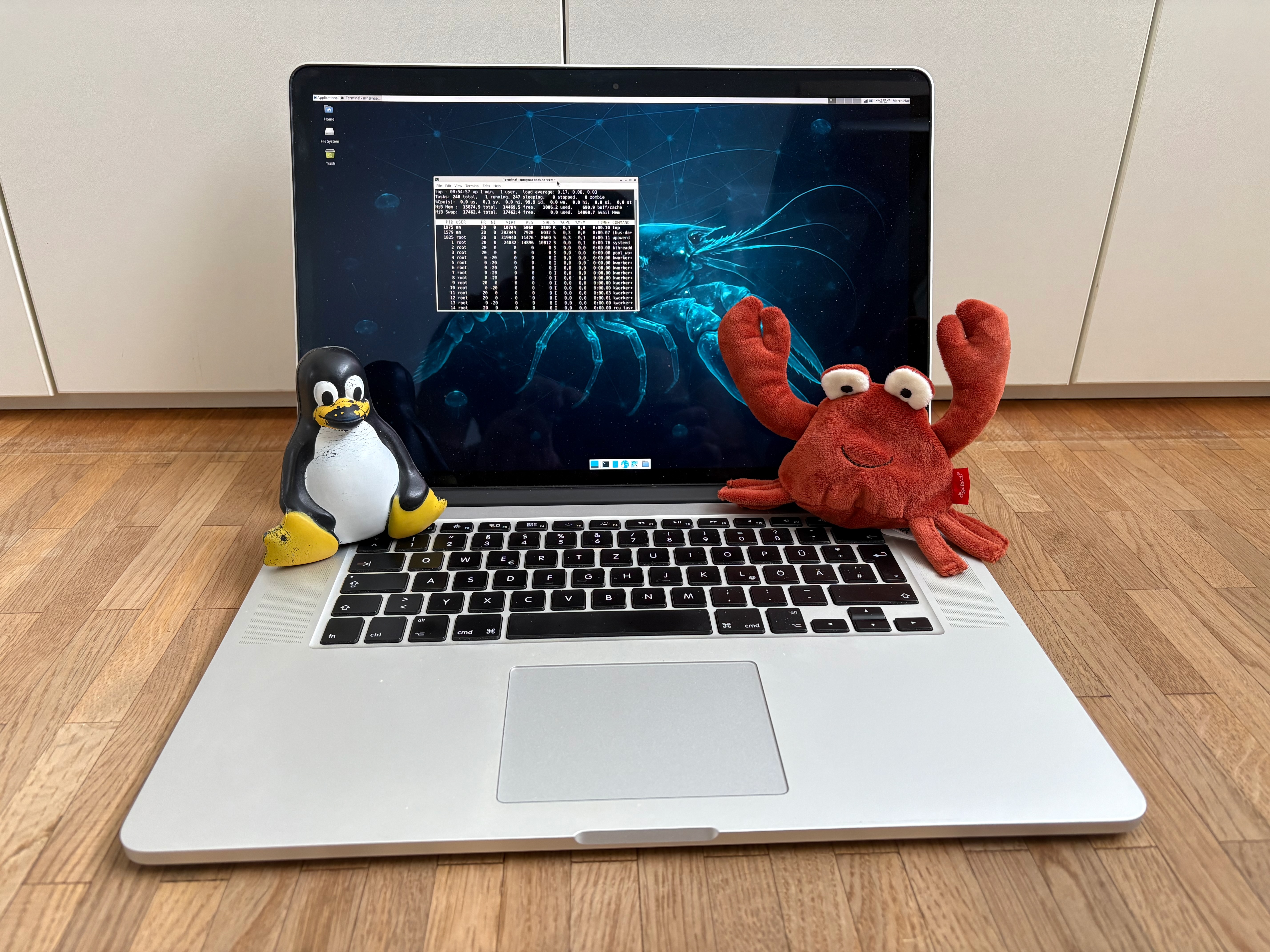
<p><img src="https://deliberate.codes/blog/2026/old-macbook-coding-agent-server/ferris.jpeg" alt="Ferris: a 15“ Retina MacBook Pro running Debian and XFCE, flanked by Tux and the Rust crab." /></p>
<h2 id="building-ferris">Building Ferris<a class="zola-anchor" href="#building-ferris" aria-label="Anchor link for: building-ferris">#</a>
</h2>
<p>Ferris is my old 15“ Retina MacBook Pro. It was my favorite laptop and partner in crime for over five years until we parted ways for a newer MacBook Pro. Since then it has been sitting in my drawer without a purpose. The specs are (roughly): Intel Core i7 at 2.50 GHz, 16 GB RAM, NVidia graphics with 2 GB NVRAM.</p>
<p>When I read about all the people running <a rel="external" href="https://openclawai.io/">OpenClaw</a> or other agents on tiny VMs in the cloud, I thought: “Ferris still has ample power for Claude Code or Codex”. I run LLMs in the cloud via Anthropic or OpenAI, so the heavy thinking happens in the cloud anyway. Ferris only has to handle file operations and, of course, compiling the software it generates.</p>
<p>I started by installing <a rel="external" href="https://www.debian.org/releases/stable/">Debian 13 “trixie”</a>. The process was straightforward:</p>
<ol>
<li>Download a live install image. I went with <a rel="external" href="https://cdimage.debian.org/debian-cd/current-live/amd64/iso-hybrid/debian-live-13.4.0-amd64-xfce.iso">Live Xfce <code>amd64</code></a>.</li>
<li>Still on macOS, flash an old USB stick using <a rel="external" href="https://etcher.balena.io">balenaEtcher</a>.</li>
<li>Reboot the Mac and hold <code>Option (⌥)</code> to select the Debian Live Installer.</li>
<li>Install with defaults.</li>
</ol>
<p>Once Linux is installed, you want it to stop sleeping even when the display lid is closed. Set the following in <code>/etc/systemd/logind.conf</code>:</p>
<pre class="giallo" style="color: #D8DEE9; background-color: #2E3440;"><code data-lang="shellscript"><span class="giallo-l"><span style="color: #ECEFF4;">[</span><span>Login</span><span style="color: #ECEFF4;">]</span></span>
<span class="giallo-l"><span>HandleLidSwitch</span><span style="color: #81A1C1;">=</span><span style="color: #A3BE8C;">ignore</span></span>
<span class="giallo-l"><span>HandleLidSwitchExternalPower</span><span style="color: #81A1C1;">=</span><span style="color: #A3BE8C;">ignore</span></span>
<span class="giallo-l"><span>HandleLidSwitchDocked</span><span style="color: #81A1C1;">=</span><span style="color: #A3BE8C;">ignore</span></span></code></pre>
<p>Installing Debian is generic, disabling lid sleep was pretty straightforward. Next step on my journey: how to sign in to my Claude and OpenAI subscriptions via a browser on a remote machine?</p>
<h2 id="about-tokens-and-window-managers">About tokens and window managers<a class="zola-anchor" href="#about-tokens-and-window-managers" aria-label="Anchor link for: about-tokens-and-window-managers">#</a>
</h2>
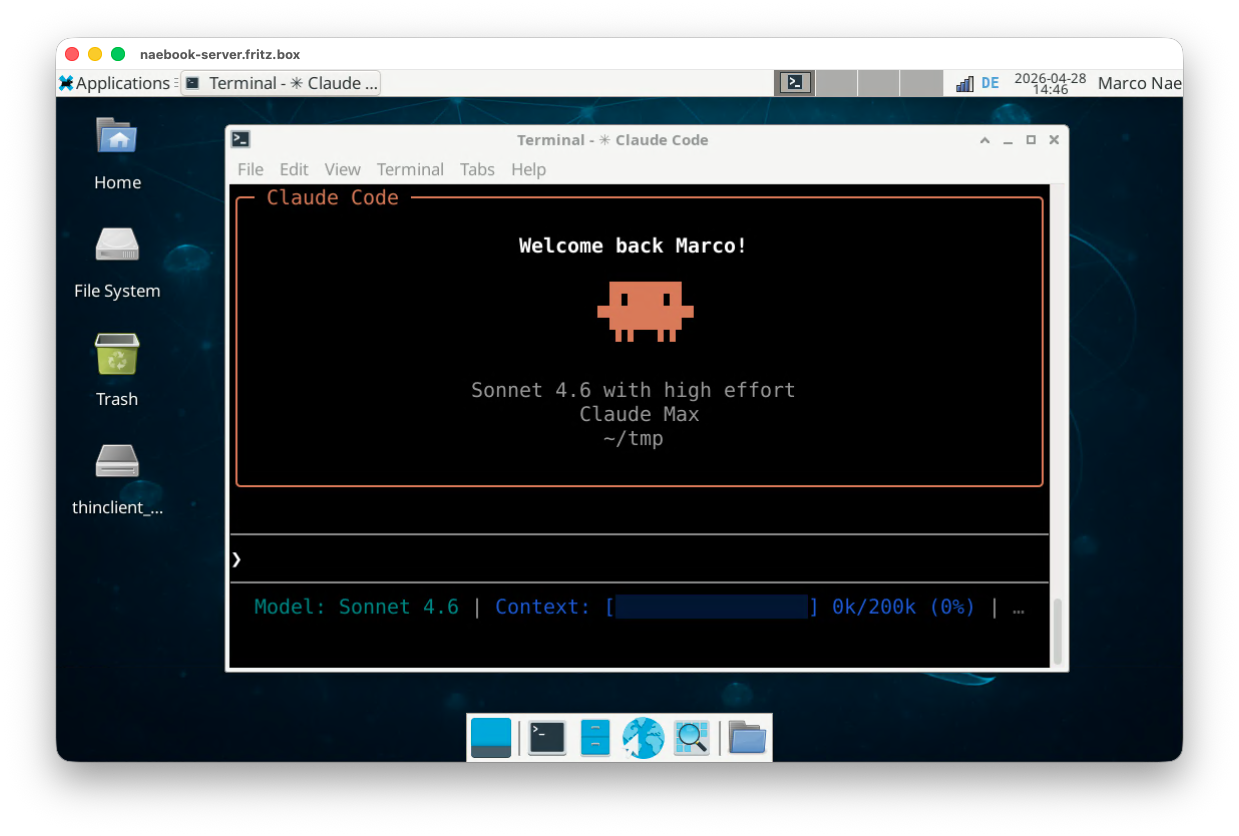
<p><img src="https://deliberate.codes/blog/2026/old-macbook-coding-agent-server/ferris-claude.png" alt="Logging into Claude Code on Firefox in XFCE." /></p>
<p>My plan was to keep using my Claude 5x and ChatGPT Plus subscriptions on Ferris. Raw API tokens add up fast; the subscriptions cap that cost at a flat monthly rate. To use either of them on Ferris, I needed a way to log in via a browser. That ruled out a headless setup and brought me to <a rel="external" href="https://www.xfce.org/">XFCE</a>, a lightweight window manager for Linux. The <a rel="external" href="https://cdimage.debian.org/debian-cd/current-live/amd64/iso-hybrid/debian-live-13.4.0-amd64-xfce.iso">Debian Live XFCE image</a> ships with Firefox already installed, which covers everything I need.</p>
<p>The next question was: how to connect to XFCE remotely? After discussing this with Claude, my goal was to connect to XFCE on Ferris via RDP. The server for RDP on Linux is called <code>xrdp</code> and I summarized a tutorial on how to configure it in the TIL <a href="https://deliberate.codes/til/2026/xrdp-xfce-debian-13/">Configure XRDP and XFCE on Debian 13</a>.</p>
<p>On my main Mac I use <a rel="external" href="https://learn.microsoft.com/en-us/windows-app/overview">Windows App</a> by Microsoft to connect to Ferris’ XFCE. Windows App is Microsoft’s RDP client; on macOS it replaced the older Microsoft Remote Desktop app and connects to any RDP server.</p>
<h2 id="what-ferris-actually-does-for-me">What Ferris actually does for me<a class="zola-anchor" href="#what-ferris-actually-does-for-me" aria-label="Anchor link for: what-ferris-actually-does-for-me">#</a>
</h2>
<p>Three use cases keep Ferris busy: coding agent runs in YOLO mode, remote control from anywhere, and conversations with my second brain from a phone.</p>
<h3 id="building-software-in-yolo-mode">Building software in YOLO mode<a class="zola-anchor" href="#building-software-in-yolo-mode" aria-label="Anchor link for: building-software-in-yolo-mode">#</a>
</h3>
<p>My primary use case for Ferris is <strong>building software with Claude in YOLO mode</strong>. <a rel="external" href="https://code.claude.com/docs/en/permission-modes">YOLO mode</a> (Claude Code’s <code>--dangerously-skip-permissions</code> flag) means the coding agent does not stop and ask for permission before running tools. This is the unlock: I prompt Ferris with a set of instructions and the tasks are usually done by the time I check back.</p>
<p>The flag turns off the per-tool permission prompts so the agent can run unattended:</p>
<pre class="giallo" style="color: #D8DEE9; background-color: #2E3440;"><code data-lang="shellscript"><span class="giallo-l"><span style="color: #81A1C1;">&gt;</span><span> claude --dangerously-skip-permissions</span></span>
<span class="giallo-l"><span style="color: #81A1C1;">&gt;</span><span style="color: #616E88;"> # Or as alias</span></span>
<span class="giallo-l"><span style="color: #81A1C1;">&gt; alias</span><span> claude-yolo</span><span style="color: #81A1C1;">=</span><span style="color: #ECEFF4;">&#39;</span><span style="color: #A3BE8C;">claude --dangerously-skip-permissions</span><span style="color: #ECEFF4;">&#39;</span></span></code></pre>
<p>My routine workflow is spec-driven development with <a href="https://deliberate.codes/blog/2026/introducing-speq-skill/">speq-skill</a>; I have a <a href="https://deliberate.codes/blog/2026/spec-driven-development-an-introduction/">series on the topic</a> here on the blog. YOLO mode took this to the next level. With permission prompts off, Ferris can work through an entire plan while I am away from the computer.</p>
<h3 id="remote-controlling-sessions">Remote-controlling sessions<a class="zola-anchor" href="#remote-controlling-sessions" aria-label="Anchor link for: remote-controlling-sessions">#</a>
</h3>
<p>Anthropic’s Remote Control feature lets you continue any Claude Code session from the web interface, the Claude app on your phone, or the desktop app. The docs are at <a rel="external" href="https://code.claude.com/docs/en/remote-control">Continue local sessions from any device</a>.</p>
<p>I run <code>/remote-control some-name</code> inside Claude Code to enable remote access. The next puzzle piece was keeping the terminal session alive that Claude Code was invoked in. <a rel="external" href="https://github.com/tmux/tmux">tmux</a> solves that (see also my TIL <a href="https://deliberate.codes/til/2025/tmux-terminal-multiplexer/">tmux: terminal multiplexer</a>):</p>
<pre class="giallo" style="color: #D8DEE9; background-color: #2E3440;"><code data-lang="shellscript"><span class="giallo-l"><span style="color: #616E88;"># SSH into Ferris</span></span>
<span class="giallo-l"><span style="color: #81A1C1;">&gt;</span><span> ssh marco@ferris.local</span></span>
<span class="giallo-l"></span>
<span class="giallo-l"><span style="color: #616E88;"># Start a new tmux session</span></span>
<span class="giallo-l"><span style="color: #88C0D0;">marco@ferris</span><span>&gt;</span><span style="color: #A3BE8C;"> tmux new</span></span>
<span class="giallo-l"></span>
<span class="giallo-l"><span style="color: #616E88;"># Start Claude in YOLO mode</span></span>
<span class="giallo-l"><span style="color: #88C0D0;">tmux[0]</span><span>&gt;</span><span style="color: #A3BE8C;"> claude-yolo</span></span>
<span class="giallo-l"></span>
<span class="giallo-l"><span style="color: #616E88;"># Trigger Remote Control within the session</span></span>
<span class="giallo-l"><span style="color: #88C0D0;">claude</span><span>&gt;</span><span style="color: #A3BE8C;"> /remote-control my-session</span></span></code></pre><h3 id="chatting-with-my-second-brain-on-the-phone">Chatting with my second brain on the phone<a class="zola-anchor" href="#chatting-with-my-second-brain-on-the-phone" aria-label="Anchor link for: chatting-with-my-second-brain-on-the-phone">#</a>
</h3>
<p>For coding I prefer an actual keyboard and a bigger screen. But there is one use case where the phone wins: chatting with my <em>second brain</em> from anywhere.</p>
<p>I took <a rel="external" href="https://gist.github.com/karpathy/442a6bf555914893e9891c11519de94f">Karpathy’s LLM Wiki gist</a> and built myself an LLM wiki I call <em>second brain</em>. It is a collection of Markdown files about my content and posts, both for this blog and for LinkedIn. Every time I have a question, a thought, or an idea for an article or a post, I use my phone and Claude to iterate on it via a remote session running on Ferris.</p>
<h2 id="learnings-and-outlook">Learnings and outlook<a class="zola-anchor" href="#learnings-and-outlook" aria-label="Anchor link for: learnings-and-outlook">#</a>
</h2>
<p>My biggest learning from this experiment is the freedom and productivity I gain once the agent runs on a remote machine and no longer stops for permission approvals. For me this is a big step towards a setup in which agents work autonomously on my behalf. It helps a lot to have the agent constrained to a designated host that is replaceable in case the agent destroys it. On that note, it also raises a lot of questions about security and guardrails. For example: what do I do with my GitHub credentials, and how can I limit the agents so that they cannot do any harm?</p>
<p>As a next step I want to explore “always on” agents in more detail. I want to give <a rel="external" href="https://openclawai.io">OpenClaw</a> a try, and also check out alternatives such as <a rel="external" href="https://nanoclaw.dev">NanoClaw</a>.</p>
]]></content>
    </entry>
    <entry xml:lang="en">
        <title>TIL: Configure XRDP and XFCE on Debian 13</title>
        <published>2026-03-19T00:00:00+00:00</published>
        <updated>2026-03-19T00:00:00+00:00</updated>
        <author>
            <name>deliberate.codes</name>
            <uri>https:&#x2F;&#x2F;deliberate.codes</uri>
        </author>
        <link rel="alternate" href="https://deliberate.codes/til/2026/xrdp-xfce-debian-13/"/>
        <id>https://deliberate.codes/til/2026/xrdp-xfce-debian-13/</id>
        <content type="html" xml:base="https://deliberate.codes/til/2026/xrdp-xfce-debian-13/"><![CDATA[<p>A minimal recipe for a working <a rel="external" href="https://www.xrdp.org/">XRDP</a> + <a rel="external" href="https://www.xfce.org/">XFCE</a> desktop on <a rel="external" href="https://www.debian.org/">Debian</a> 13 that holds up for any user, not just the one you happened to set up first.</p>
<h2 id="1-install-the-packages">1. Install the packages<a class="zola-anchor" href="#1-install-the-packages" aria-label="Anchor link for: 1-install-the-packages">#</a>
</h2>
<pre class="giallo" style="color: #D8DEE9; background-color: #2E3440;"><code data-lang="shellscript"><span class="giallo-l"><span style="color: #88C0D0;">sudo</span><span style="color: #A3BE8C;"> apt update</span></span>
<span class="giallo-l"><span style="color: #88C0D0;">sudo</span><span style="color: #A3BE8C;"> apt install xrdp xfce4 xfce4-goodies</span></span></code></pre><h2 id="2-use-the-stock-startwm-sh">2. Use the stock <code>startwm.sh</code><a class="zola-anchor" href="#2-use-the-stock-startwm-sh" aria-label="Anchor link for: 2-use-the-stock-startwm-sh">#</a>
</h2>
<p>Custom <code>startwm.sh</code> scripts are the most common reason fresh users fail to get a desktop while the admin account works. Keep <code>/etc/xrdp/startwm.sh</code> at the package default:</p>
<pre class="giallo" style="color: #D8DEE9; background-color: #2E3440;"><code data-lang="shellscript"><span class="giallo-l"><span style="color: #616E88;">#!/bin/sh</span></span>
<span class="giallo-l"><span style="color: #81A1C1;">if</span><span style="color: #88C0D0;"> test</span><span style="color: #A3BE8C;"> -r /etc/profile</span><span style="color: #81A1C1;">; then</span></span>
<span class="giallo-l"><span style="color: #88C0D0;">    .</span><span style="color: #A3BE8C;"> /etc/profile</span></span>
<span class="giallo-l"><span style="color: #81A1C1;">fi</span></span>
<span class="giallo-l"><span style="color: #81A1C1;">if</span><span style="color: #88C0D0;"> test</span><span style="color: #A3BE8C;"> -r ~/.profile</span><span style="color: #81A1C1;">; then</span></span>
<span class="giallo-l"><span style="color: #88C0D0;">    .</span><span style="color: #A3BE8C;"> ~/.profile</span></span>
<span class="giallo-l"><span style="color: #81A1C1;">fi</span></span>
<span class="giallo-l"><span style="color: #88C0D0;">test</span><span style="color: #A3BE8C;"> -x /etc/X11/Xsession</span><span style="color: #ECEFF4;"> &amp;&amp;</span><span style="color: #88C0D0;"> exec</span><span style="color: #A3BE8C;"> /etc/X11/Xsession</span></span>
<span class="giallo-l"><span style="color: #88C0D0;">exec</span><span style="color: #A3BE8C;"> /bin/sh /etc/X11/Xsession</span></span></code></pre><pre class="giallo" style="color: #D8DEE9; background-color: #2E3440;"><code data-lang="shellscript"><span class="giallo-l"><span style="color: #88C0D0;">sudo</span><span style="color: #A3BE8C;"> chmod</span><span style="color: #B48EAD;"> 755</span><span style="color: #A3BE8C;"> /etc/xrdp/startwm.sh</span></span></code></pre><h2 id="3-set-the-system-x-session-manager-to-xfce">3. Set the system X session manager to XFCE<a class="zola-anchor" href="#3-set-the-system-x-session-manager-to-xfce" aria-label="Anchor link for: 3-set-the-system-x-session-manager-to-xfce">#</a>
</h2>
<p>XRDP hands off to whatever <code>x-session-manager</code> resolves to. Point it at XFCE explicitly:</p>
<pre class="giallo" style="color: #D8DEE9; background-color: #2E3440;"><code data-lang="shellscript"><span class="giallo-l"><span style="color: #88C0D0;">sudo</span><span style="color: #A3BE8C;"> update-alternatives --config x-session-manager</span></span>
<span class="giallo-l"><span style="color: #616E88;"># pick xfce4-session</span></span></code></pre><h2 id="4-skip-per-user-xsession-files">4. Skip per-user <code>.xsession</code> files<a class="zola-anchor" href="#4-skip-per-user-xsession-files" aria-label="Anchor link for: 4-skip-per-user-xsession-files">#</a>
</h2>
<p>Don’t drop <code>.xsession</code> into new users’ home directories. The system default Xsession path picks the right session manager on its own, and a hand-edited <code>.xsession</code> shadows it.</p>
<h2 id="5-start-xrdp">5. Start XRDP<a class="zola-anchor" href="#5-start-xrdp" aria-label="Anchor link for: 5-start-xrdp">#</a>
</h2>
<pre class="giallo" style="color: #D8DEE9; background-color: #2E3440;"><code data-lang="shellscript"><span class="giallo-l"><span style="color: #88C0D0;">sudo</span><span style="color: #A3BE8C;"> systemctl enable --now xrdp</span></span></code></pre>
<p>Connect from any RDP client to port 3389. If a fresh account still can’t get a desktop while the original works, the desktop session is failing rather than the RDP transport. Check <code>journalctl -u xrdp-sesman</code> for the exit code, then switch that user to VNC if you don’t want to keep debugging the X handoff.</p>
]]></content>
    </entry>
    <entry xml:lang="en">
        <title>Collaborative agentic engineering: how teams build software with AI agents</title>
        <published>2026-03-04T00:00:00+00:00</published>
        <updated>2026-03-04T00:00:00+00:00</updated>
        <author>
            <name>deliberate.codes</name>
            <uri>https:&#x2F;&#x2F;deliberate.codes</uri>
        </author>
        <link rel="alternate" href="https://deliberate.codes/blog/2026/collaborative-agentic-engineering/"/>
        <id>https://deliberate.codes/blog/2026/collaborative-agentic-engineering/</id>
        <content type="html" xml:base="https://deliberate.codes/blog/2026/collaborative-agentic-engineering/"><![CDATA[<p>Multiple engineers, each with their own coding agent, one shared codebase. How do you avoid chaos?</p>
<p>Your team already knows how to coordinate on code. Git, feature branches, pull requests. This is considered best practice and all software teams that I know are working with this.</p>
<p><a href="https://deliberate.codes/blog/2026/spec-driven-development-an-introduction/">Agentic engineering</a> doesn’t change this model. What it changes is what needs to travel alongside the code:</p>
<ol>
<li><strong>Intent must be formalized and shared.</strong> Coding agents need structured context to make good decisions. That context has to be part of the shared codebase in the repository.</li>
<li><strong>Implementation gets faster, so coordination must keep up.</strong> When features ship in hours instead of weeks, the feedback loop between parallel efforts tightens.</li>
</ol>
<p>Git coordinates code. But code only captures what was built. It doesn’t capture what was intended, what was decided against, or what constraints other features depend on. When Tim merges a restructured billing module on Monday and Hannah starts building on that module on Tuesday, her agent has no idea why Tim changed the interface, what constraints he introduced, or what behavior he expects. The code is there, but the reasoning behind it is gone.</p>
<p>Spec-driven development fills this gap. It gives coding agents structured intent: requirements, edge cases, and expected behavior, formalized as Markdown files in the Git repository. With specs anchored next to the code, the coordination patterns teams already use apply automatically. Branch them, review them, merge them.</p>
<p>This works whether features build on each other or develop in parallel. When an engineer extends a colleague’s recently merged work, their agent finds the relevant specs and understands the intent behind the code. When two engineers work on separate features at the same time, each agent has the full spec library as context, and both sets of specs merge through the normal PR process.</p>
<p>I built <a href="https://deliberate.codes/blog/2026/introducing-speq-skill/">speq-skill</a> to enable this: an iterative, shared workflow for spec-driven development that supports parallel feature work, both within a team and as a solo developer. Here’s how the workflow looks in practice.</p>
<h2 id="the-workflow">The workflow<a class="zola-anchor" href="#the-workflow" aria-label="Anchor link for: the-workflow">#</a>
</h2>
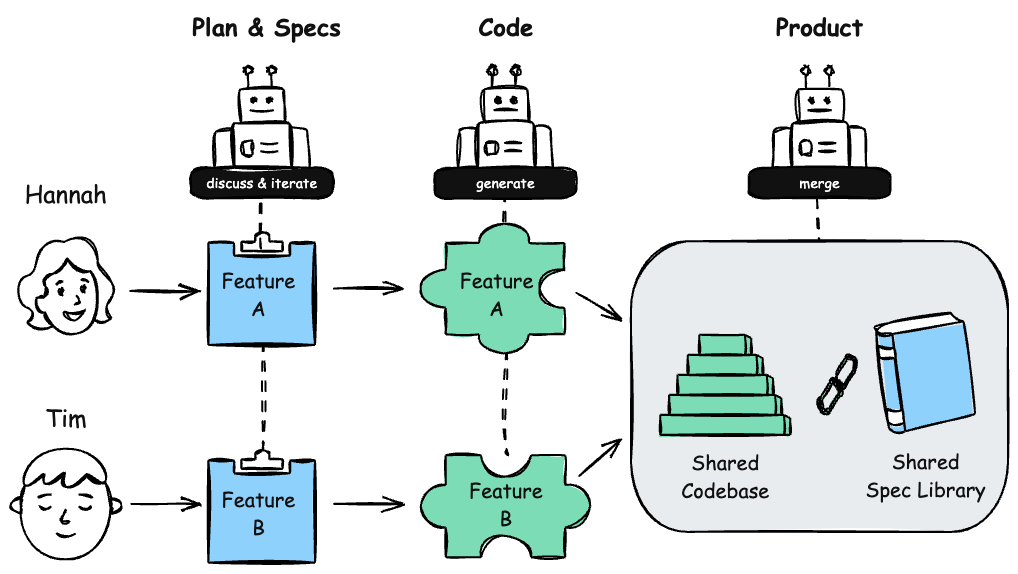
<p>Consider this scenario. Tim is adding a payment retry system. Hannah is building an invoice export feature. Both work on separate feature branches. The diagram below shows the full lifecycle.</p>
<p><img src="https://deliberate.codes/blog/2026/collaborative-agentic-engineering/agentic-engineering-team.png" alt="Collaborative agentic engineering with spec-driven development" /></p>
<p><strong>Tim plans his feature.</strong> He creates a branch and plans with his agent. The agent searches the existing spec library on main, finds relevant specs, and uses them as context. It conducts a clarifying interview: What exactly should happen when a payment fails? How many retries? What’s the backoff strategy? Together they produce spec deltas: markdown files describing the new behavior in BDD-style scenarios. The spec deltas land in <code>specs/_plans/</code> on Tim’s branch, the staging area.</p>
<p><strong>Tim’s agent implements.</strong> It reads the spec deltas and builds the feature, writes integration tests that validate each scenario, runs them, and verifies everything works. The staging area stays active throughout, pushed to the branch alongside the code. Nothing touches main.</p>
<p><strong>Hannah does the same on her branch.</strong> She plans her invoice export, produces her own spec deltas, and implements independently. Her agent loads the spec library from main plus her own staging area. The two branches develop in parallel.</p>
<p><strong>Tim records and opens a PR.</strong> When implementation is complete and verified, Tim records his specs. This moves the deltas from the staging area into the permanent spec library, still on his feature branch. He opens a pull request that includes code, tests, and the recorded specs. The reviewer sees both what Tim built and what he intended. Humans evaluate architecture and design. The AI checks correctness: does the implementation match the specs? Are the scenarios covered by tests? The spec and the code are reviewable together, in one place.</p>
<p><strong>The PR merges.</strong> <code>main</code> now includes Tim’s feature, his tests, and his specs.</p>
<p><strong>Hannah rebases.</strong> She pulls in Tim’s changes. If there are conflicts in the specs, they’re handled the same way as code conflicts. Her coding agent can resolve straightforward ones and ask clarifying questions when the intent is ambiguous. After rebasing, Hannah’s agent has access to Tim’s merged specs when it searches the library.</p>
<p>The cycle repeats with every feature.</p>
<h2 id="the-spec-library-grows-with-the-team">The spec library grows with the team<a class="zola-anchor" href="#the-spec-library-grows-with-the-team" aria-label="Anchor link for: the-spec-library-grows-with-the-team">#</a>
</h2>
<p>Every time a feature is merged, its requirements and scenarios update the permanent spec library on <code>main</code>. The next time any engineer plans a feature, their agent searches this library and loads the relevant requirements and scenarios into its context window.</p>
<p>Tim’s agent now knows about Hannah’s invoice export, even if Tim never looked at her code. If Hannah’s export spec says “the system <em>SHALL</em> exclude archived invoices older than 90 days,” Tim’s agent picks that up when planning a reporting feature that aggregates invoice data. Without that spec, Tim’s agent might have included archived invoices, creating an inconsistency nobody catches until a customer files a bug.</p>
<p>The shared spec library acts as a shared memory bank both for humans and coding agents.</p>
<h2 id="solo-devs-git-worktrees">Solo devs: git worktrees<a class="zola-anchor" href="#solo-devs-git-worktrees" aria-label="Anchor link for: solo-devs-git-worktrees">#</a>
</h2>
<p>The same workflow works for a solo developer building multiple features in parallel. Git worktrees give you multiple checked-out branches simultaneously, each with its own staging area and agent session. Same discipline, same coordination through the spec library on main.</p>
<h2 id="get-started">Get started<a class="zola-anchor" href="#get-started" aria-label="Anchor link for: get-started">#</a>
</h2>
<p>speq-skill is open source and free to use. Get started here: <a rel="external" href="https://github.com/marconae/speq-skill">github.com/marconae/speq-skill</a>.</p>
<p>If you want to dig deeper into the ideas behind this workflow, start with <a href="https://deliberate.codes/blog/2026/spec-driven-development-an-introduction/">Spec-driven development: an introduction</a> and <a href="https://deliberate.codes/blog/2026/writing-specs-for-ai-coding-agents/">Writing specs for AI coding agents</a>. For the tool that puts it all together: <a href="https://deliberate.codes/blog/2026/introducing-speq-skill/">Introducing speq-skill</a>.</p>
]]></content>
    </entry>
    <entry xml:lang="en">
        <title>Introducing speq-skill: spec-driven development with semantic search</title>
        <published>2026-02-23T00:00:00+00:00</published>
        <updated>2026-02-23T00:00:00+00:00</updated>
        <author>
            <name>deliberate.codes</name>
            <uri>https:&#x2F;&#x2F;deliberate.codes</uri>
        </author>
        <link rel="alternate" href="https://deliberate.codes/blog/2026/introducing-speq-skill/"/>
        <id>https://deliberate.codes/blog/2026/introducing-speq-skill/</id>
        <content type="html" xml:base="https://deliberate.codes/blog/2026/introducing-speq-skill/"><![CDATA[<p>Everybody agrees: AI makes code cheap. The question is: how do you get the AI to produce working and tested software?</p>
<p>In the past months I have worked intensively with coding agents. My favorite agent so far is <a href="/tags/claude-code/">Claude Code</a>, and since the release of <a rel="external" href="https://www.anthropic.com/news/claude-opus-4-6">Opus 4.6</a> it has become my go-to tool for writing software.</p>
<p>Here’s what I’ve learned:</p>
<ul>
<li>The bottleneck is no longer writing code.</li>
<li>It’s telling the agent what to build. Precisely enough that the result actually works.</li>
</ul>
<p>Today, most people deal with this in one of two ways:</p>
<ol>
<li>Vibe coding — just prompt and iterate. It’s <a href="https://deliberate.codes/blog/2026/cure-for-the-vibe-coding-hangover/">fast for prototypes</a>, but it doesn’t scale.</li>
<li>Copy-paste prompting — collect snippets and prompt templates, paste them in before each task. Better than vibe coding, but it doesn’t build a lasting knowledge base.</li>
</ol>
<p>What both approaches are missing is a system.</p>
<h2 id="what-s-missing-is-a-system">What’s missing is a system<a class="zola-anchor" href="#what-s-missing-is-a-system" aria-label="Anchor link for: what-s-missing-is-a-system">#</a>
</h2>
<p>I’ve written about this on the blog: <a href="https://deliberate.codes/blog/2026/spec-driven-development-an-introduction/">spec-driven development as a methodology</a>, <a href="https://deliberate.codes/blog/2026/cure-for-the-vibe-coding-hangover/">why vibe coding doesn’t scale</a>, and <a href="https://deliberate.codes/blog/2026/writing-specs-for-ai-coding-agents/">how to write effective specs</a>. For me, spec-driven development is the missing system for coding agents.</p>
<p>There are tools out there — OpenSpec, BMAD, SpecKit, etc. but none of them gave me:</p>
<ul>
<li>Integration tests as proof the software actually works</li>
<li>No lock-in to a single language like Python</li>
<li>Smart enough to only load relevant specs</li>
<li>A system that asks me instead of making assumptions</li>
<li>A system that works also in brownfield projects</li>
</ul>
<h2 id="introducing-speq-skill">Introducing speq-skill<a class="zola-anchor" href="#introducing-speq-skill" aria-label="Anchor link for: introducing-speq-skill">#</a>
</h2>
<p>So I built <a rel="external" href="https://github.com/marconae/speq-skill">speq-skill</a>. It’s a free <a href="/tags/claude-code/">Claude Code</a> plugin with a lightweight CLI and skills.</p>
<p>The core idea: your specs live permanently in your project. The CLI adds semantic search so the coding agent finds only the relevant specs to avoid cluttering the context window. The skills add guardrails for code quality and enforced integration tests and TDD.</p>
<h2 id="the-workflow">The workflow<a class="zola-anchor" href="#the-workflow" aria-label="Anchor link for: the-workflow">#</a>
</h2>
<p>speq-skill follows a four-phase cycle: mission, plan, implement, record.</p>
<h3 id="mission">Mission<a class="zola-anchor" href="#mission" aria-label="Anchor link for: mission">#</a>
</h3>
<p>Every project starts with a mission file. The agent interviews you about the project’s purpose, target users, tech stack, architecture, and constraints, then generates <code>specs/mission.md</code>. This is a one-time setup that gives every future session the context it needs.</p>
<h3 id="plan">Plan<a class="zola-anchor" href="#plan" aria-label="Anchor link for: plan">#</a>
</h3>
<p>When you’re ready to build a feature, run <code>/speq:plan</code>. The agent searches the existing spec library for related features semantically, asks you clarifying questions, and produces an implementation plan and spec deltas for your feature. The spec deltas are markdown files with requirements written as <a href="https://deliberate.codes/blog/2026/writing-specs-for-ai-coding-agents/">BDD-style scenarios using RFC 2119 keywords</a>. Each plan lives in a staging area <code>specs/_plans/</code> until implementation is complete.</p>
<p>This is the phase where intent gets clarified. The agent is instructed to conduct a clarifying interview with you so that gaps or vague elements of your prompt are discussed.</p>
<h3 id="implement">Implement<a class="zola-anchor" href="#implement" aria-label="Anchor link for: implement">#</a>
</h3>
<p>Run <code>/speq:implement &lt;plan-name&gt;</code> to instruct the coding agent to orchestrate the implementation of a plan. The coding agent will spawn sub-agents that not only generate the code but also make sure that the planned feature are working. The verification is done with enforced integration tests and the rule to obtain factual evidence for working software instead of claiming success. During the implementation the agent follows quality guardrails for code style and testing.</p>
<h3 id="record">Record<a class="zola-anchor" href="#record" aria-label="Anchor link for: record">#</a>
</h3>
<p>After implementation, <code>/speq:record</code> merges the spec delta into the permanent library in <code>specs/</code>. Your specs accumulate over time, forming a growing knowledge base of what the software does and why.</p>
<h2 id="the-spec-library">The spec library<a class="zola-anchor" href="#the-spec-library" aria-label="Anchor link for: the-spec-library">#</a>
</h2>
<p>Specs live in your project as plain markdown files, organized by domain and feature:</p>
<pre class="giallo" style="color: #D8DEE9; background-color: #2E3440;"><code data-lang="plain"><span class="giallo-l"><span>specs/</span></span>
<span class="giallo-l"><span>  mission.md</span></span>
<span class="giallo-l"><span>  _plans/          # staging area for in-progress work</span></span>
<span class="giallo-l"><span>  _recorded/       # completed plans, kept for reference</span></span>
<span class="giallo-l"><span>  auth/</span></span>
<span class="giallo-l"><span>    login/</span></span>
<span class="giallo-l"><span>      spec.md</span></span>
<span class="giallo-l"><span>    signup/</span></span>
<span class="giallo-l"><span>      spec.md</span></span>
<span class="giallo-l"><span>  billing/</span></span>
<span class="giallo-l"><span>    invoices/</span></span>
<span class="giallo-l"><span>      spec.md</span></span></code></pre>
<p>Two directories have special roles. <code>_plans/</code> is the staging area where plans with spec deltas live while a feature is being planned and implemented. <code>_recorded/</code> is where completed plans are moved after the agent merges their deltas into the permanent library. You can review recorded plans to trace how your project evolved.</p>
<p>Each spec uses BDD-style Given/When/Then scenarios with RFC 2119 keywords (SHALL, SHOULD, MAY) to express requirements at the right level of precision. For example:</p>
<pre class="giallo" style="color: #D8DEE9; background-color: #2E3440;"><code data-lang="markdown"><span class="giallo-l"><span style="color: #81A1C1;">###</span><span style="color: #88C0D0;"> Scenario: expired token</span></span>
<span class="giallo-l"></span>
<span class="giallo-l"><span style="color: #ECEFF4;">-</span><span> Given a user with an expired authentication token</span></span>
<span class="giallo-l"><span style="color: #ECEFF4;">-</span><span> When the user requests a protected resource</span></span>
<span class="giallo-l"><span style="color: #ECEFF4;">-</span><span> Then the system SHALL return a 401 status code</span></span>
<span class="giallo-l"><span style="color: #ECEFF4;">-</span><span> And the system SHALL include a </span><span style="color: #8FBCBB;">`WWW-Authenticate`</span><span> header</span></span></code></pre>
<p>See <a href="https://deliberate.codes/blog/2026/writing-specs-for-ai-coding-agents/">writing specs for AI coding agents</a> for the full guide on this format.</p>
<p>The library grows over time as plans get recorded. After a few features, you have a searchable knowledge base of what the software does and why.</p>
<h2 id="the-cli">The CLI<a class="zola-anchor" href="#the-cli" aria-label="Anchor link for: the-cli">#</a>
</h2>
<p>The <code>speq</code> CLI is the backbone that the agent calls during planning and implementation. It provides two core capabilities:</p>
<ul>
<li><strong>Semantic search</strong> (<code>speq search</code>) — indexes the spec library with <a rel="external" href="https://huggingface.co/Snowflake/snowflake-arctic-embed-xs">Snowflake Arctic Embed</a>, a compact embeddings model (~23 MB). The agent queries for relevant specs instead of loading everything, keeping the context window focused on what matters for the current task.</li>
<li><strong>Structure validation</strong> (<code>speq feature validate</code>, <code>speq plan validate</code>) — enforces that specs follow the required BDD/RFC 2119 format. The agent runs validation after writing specs to catch structural issues early.</li>
</ul>
<p>The CLI also offers <code>speq domain list</code> and <code>speq feature list</code> for navigating the spec library.</p>
<h2 id="bundled-skills">Bundled skills<a class="zola-anchor" href="#bundled-skills" aria-label="Anchor link for: bundled-skills">#</a>
</h2>
<p><a rel="external" href="https://github.com/marconae/speq-skill">speq-skill</a> bundles three core skills alongside the workflow:</p>
<ul>
<li><strong>Code navigation</strong> via <a rel="external" href="https://github.com/oraios/serena">Serena</a>, for semantic code exploration</li>
<li><strong>External documentation</strong> via <a rel="external" href="https://context7.com/">Context7</a>, for pulling in up-to-date library docs</li>
<li><strong>Code quality guardrails</strong> to enforce clean code and Test-Driven Development</li>
</ul>
<p>Serena and Context7 are two of the most popular MCP servers in the Claude Code ecosystem. The skills teach the agent when and how to use them effectively, so you get the benefits of both tools without having to prompt for them manually.</p>
<h2 id="get-started">Get started<a class="zola-anchor" href="#get-started" aria-label="Anchor link for: get-started">#</a>
</h2>
<p>speq-skill is open source and free to use. Installation instructions and full documentation are on <a rel="external" href="https://github.com/marconae/speq-skill">GitHub</a>.</p>
<p>If you’re new to spec-driven development, the three-part blog series provides the foundation:</p>
<ol>
<li><a href="https://deliberate.codes/blog/2026/spec-driven-development-an-introduction/">Spec-driven development: an introduction</a></li>
<li><a href="https://deliberate.codes/blog/2026/cure-for-the-vibe-coding-hangover/">A cure for the vibe coding hangover</a></li>
<li><a href="https://deliberate.codes/blog/2026/writing-specs-for-ai-coding-agents/">Writing specs for AI coding agents</a></li>
</ol>
]]></content>
    </entry>
    <entry xml:lang="en">
        <title>Writing specs for AI coding agents</title>
        <published>2026-02-01T00:00:00+00:00</published>
        <updated>2026-02-01T00:00:00+00:00</updated>
        <author>
            <name>deliberate.codes</name>
            <uri>https:&#x2F;&#x2F;deliberate.codes</uri>
        </author>
        <link rel="alternate" href="https://deliberate.codes/blog/2026/writing-specs-for-ai-coding-agents/"/>
        <id>https://deliberate.codes/blog/2026/writing-specs-for-ai-coding-agents/</id>
        <content type="html" xml:base="https://deliberate.codes/blog/2026/writing-specs-for-ai-coding-agents/"><![CDATA[<p>Vague specs produce vague code. When working with AI coding agents, the quality of your specifications directly determines the quality of the output. This post covers how to write specs that leave no room for interpretation.</p>
<p>If you’re new to spec-driven development, start with <a href="https://deliberate.codes/blog/2026/spec-driven-development-an-introduction/">the introduction</a> for context on what it is and which tools exist.</p>
<h2 id="the-problem-with-prose">The problem with prose<a class="zola-anchor" href="#the-problem-with-prose" aria-label="Anchor link for: the-problem-with-prose">#</a>
</h2>
<p>Vibe coding works like this: you describe what you want in conversational prose, the AI generates code, you iterate until it looks right. The problem is that natural language is ambiguous. <em>“The system should handle invalid login attempts appropriately”</em> means different things to different people. The AI will interpret it however its training suggests, which may not match your intent.</p>
<p>Spec-driven development solves the drift problem by making specifications the primary artifact.</p>
<p>But it raises a new question: how do you structure specs for both clarity and effectiveness?</p>
<p>By borrowing patterns from <a rel="external" href="https://en.wikipedia.org/wiki/Behavior-driven_development">Behavior-Driven Development</a> (BDD) and the <a rel="external" href="https://datatracker.ietf.org/doc/html/rfc2119">RFC 2119</a> requirement keywords, you can write specs that are both human-readable and machine-parseable.</p>
<h2 id="a-structure-borrowed-from-bdd">A structure borrowed from BDD<a class="zola-anchor" href="#a-structure-borrowed-from-bdd" aria-label="Anchor link for: a-structure-borrowed-from-bdd">#</a>
</h2>
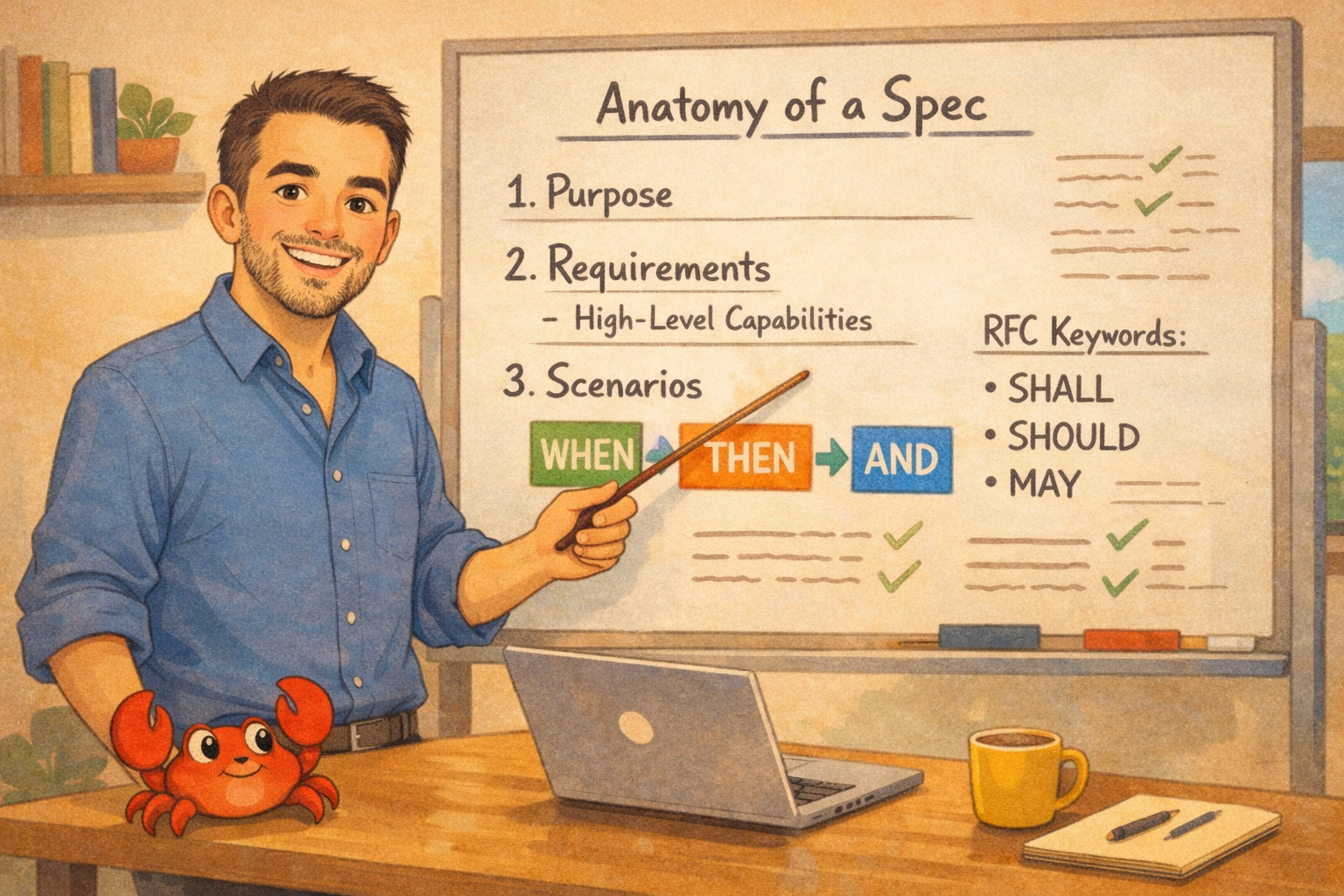
<p><img src="https://deliberate.codes/blog/2026/writing-specs-for-ai-coding-agents/comic-spec-structure.png" alt="Anatomy of a spec: purpose, requirements, scenarios with RFC keywords" /></p>
<p><a rel="external" href="https://en.wikipedia.org/wiki/Behavior-driven_development">BDD</a> is a software development practice that emerged from <a rel="external" href="https://en.wikipedia.org/wiki/Test-driven_development">Test-Driven Development</a>. Where TDD focuses on testing implementation, BDD focuses on specifying behavior from the user’s perspective. Teams write specifications in natural language that both stakeholders and developers can understand, then automate those specifications as tests.</p>
<p><a rel="external" href="https://cucumber.io/docs/gherkin/reference/">Gherkin</a> is the structured language BDD uses. It provides keywords like Feature, Scenario, Given, When, Then, and And that make specifications both readable and executable. Tools like <a rel="external" href="https://cucumber.io/">Cucumber</a> parse Gherkin files and run them as automated tests.</p>
<p>The core pattern is Given-When-Then:</p>
<pre class="giallo" style="color: #D8DEE9; background-color: #2E3440;"><code data-lang="gherkin"><span class="giallo-l"><span style="color: #81A1C1;">Given </span><span>some initial context</span></span>
<span class="giallo-l"><span style="color: #81A1C1;">When </span><span>an action occurs</span></span>
<span class="giallo-l"><span style="color: #81A1C1;">Then </span><span>expect this outcome</span></span></code></pre>
<p>For spec-driven development with AI agents, we adapt this to Markdown using <strong>Requirements</strong>, <strong>Scenarios</strong>, and <strong>WHEN-THEN-AND</strong> blocks. This preserves the clarity of Gherkin while staying in a format that works everywhere.</p>
<h2 id="the-anatomy-of-a-spec-file">The anatomy of a spec file<a class="zola-anchor" href="#the-anatomy-of-a-spec-file" aria-label="Anchor link for: the-anatomy-of-a-spec-file">#</a>
</h2>
<p>Create one spec file per feature. Each spec file contains:</p>
<ol>
<li><strong>Purpose</strong>: A summary of the feature and why it matters</li>
<li><strong>Requirements</strong>: High-level capabilities the feature must have</li>
<li><strong>Scenarios</strong>: Specific behaviors under each requirement</li>
</ol>
<p>Here’s the structure:</p>
<pre class="giallo" style="color: #D8DEE9; background-color: #2E3440;"><code data-lang="markdown"><span class="giallo-l"><span style="color: #81A1C1;">#</span><span style="color: #88C0D0;"> Feature Name Specification</span></span>
<span class="giallo-l"></span>
<span class="giallo-l"><span style="color: #81A1C1;">##</span><span style="color: #88C0D0;"> Purpose</span></span>
<span class="giallo-l"></span>
<span class="giallo-l"><span>One paragraph describing what this spec covers and why it matters.</span></span>
<span class="giallo-l"></span>
<span class="giallo-l"><span style="color: #81A1C1;">##</span><span style="color: #88C0D0;"> Requirements</span></span>
<span class="giallo-l"></span>
<span class="giallo-l"><span style="color: #81A1C1;">###</span><span style="color: #88C0D0;"> Requirement: Capability Name</span></span>
<span class="giallo-l"></span>
<span class="giallo-l"><span>Brief description of the requirement.</span></span>
<span class="giallo-l"></span>
<span class="giallo-l"><span style="color: #81A1C1;">####</span><span style="color: #88C0D0;"> Scenario: Specific behavior</span></span>
<span class="giallo-l"></span>
<span class="giallo-l"><span style="color: #ECEFF4;">-</span><span style="color: #ECEFF4;font-weight: bold;"> **</span><span style="font-weight: bold;">WHEN</span><span style="color: #ECEFF4;font-weight: bold;">**</span><span> a specific condition occurs</span></span>
<span class="giallo-l"><span style="color: #ECEFF4;">-</span><span style="color: #ECEFF4;font-weight: bold;"> **</span><span style="font-weight: bold;">THEN</span><span style="color: #ECEFF4;font-weight: bold;">**</span><span> it SHALL do something specific</span></span>
<span class="giallo-l"><span style="color: #ECEFF4;">-</span><span style="color: #ECEFF4;font-weight: bold;"> **</span><span style="font-weight: bold;">AND</span><span style="color: #ECEFF4;font-weight: bold;">**</span><span> it SHALL also do this other thing</span></span></code></pre><h2 id="rfc-2119-keywords">RFC 2119 keywords<a class="zola-anchor" href="#rfc-2119-keywords" aria-label="Anchor link for: rfc-2119-keywords">#</a>
</h2>
<p><a rel="external" href="https://datatracker.ietf.org/doc/html/rfc2119">RFC 2119</a> defines requirement keywords used in Internet standards. These keywords eliminate ambiguity about whether something is mandatory, recommended, or optional:</p>
<table><thead><tr><th>Keyword</th><th>Alternative</th><th>Meaning</th></tr></thead><tbody>
<tr><td><strong>SHALL</strong></td><td>MUST</td><td>Absolute requirement</td></tr>
<tr><td><strong>SHALL NOT</strong></td><td>MUST NOT</td><td>Absolute prohibition</td></tr>
<tr><td><strong>SHOULD</strong></td><td>RECOMMENDED</td><td>Strong recommendation, but valid exceptions may exist</td></tr>
<tr><td><strong>SHOULD NOT</strong></td><td>NOT RECOMMENDED</td><td>Strong discouragement, but valid exceptions may exist</td></tr>
<tr><td><strong>MAY</strong></td><td>OPTIONAL</td><td>Truly optional</td></tr>
</tbody></table>
<p>I found that using the full set matters. Popular <a href="https://deliberate.codes/blog/2026/spec-driven-development-an-introduction/">SDD</a> frameworks like <a rel="external" href="https://github.com/Fission-AI/OpenSpec">OpenSpec</a> default to <em>SHALL</em> only. This works for core requirements, but real systems have nuance:</p>
<ul>
<li><strong>Performance optimizations</strong> that are nice to have but not critical</li>
<li><strong>Security hardening</strong> that depends on deployment context</li>
<li><strong>Convenience features</strong> that some users want and others don’t</li>
</ul>
<p>Using only SHALL forces you to either make everything mandatory or omit optional behaviors entirely. The full RFC 2119 vocabulary lets you express degrees of importance.</p>
<h2 id="real-examples">Real examples<a class="zola-anchor" href="#real-examples" aria-label="Anchor link for: real-examples">#</a>
</h2>
<h3 id="example-database-driver-authentication">Example: Database driver authentication<a class="zola-anchor" href="#example-database-driver-authentication" aria-label="Anchor link for: example-database-driver-authentication">#</a>
</h3>
<p>This example is adapted from <a rel="external" href="https://github.com/exasol-labs/exarrow-rs">exarrow-rs</a>, an ADBC driver for Exasol databases.</p>
<pre class="giallo" style="color: #D8DEE9; background-color: #2E3440;"><code data-lang="markdown"><span class="giallo-l"><span style="color: #81A1C1;">###</span><span style="color: #88C0D0;"> Requirement: Authentication</span></span>
<span class="giallo-l"></span>
<span class="giallo-l"><span>The system SHALL implement Exasol&#39;s authentication mechanisms securely.</span></span>
<span class="giallo-l"></span>
<span class="giallo-l"><span style="color: #81A1C1;">####</span><span style="color: #88C0D0;"> Scenario: Username and password authentication</span></span>
<span class="giallo-l"></span>
<span class="giallo-l"><span style="color: #ECEFF4;">-</span><span style="color: #ECEFF4;font-weight: bold;"> **</span><span style="font-weight: bold;">WHEN</span><span style="color: #ECEFF4;font-weight: bold;">**</span><span> authenticating with username and password</span></span>
<span class="giallo-l"><span style="color: #ECEFF4;">-</span><span style="color: #ECEFF4;font-weight: bold;"> **</span><span style="font-weight: bold;">THEN</span><span style="color: #ECEFF4;font-weight: bold;">**</span><span> it SHALL send credentials securely over the connection</span></span>
<span class="giallo-l"><span style="color: #ECEFF4;">-</span><span style="color: #ECEFF4;font-weight: bold;"> **</span><span style="font-weight: bold;">AND</span><span style="color: #ECEFF4;font-weight: bold;">**</span><span> it SHALL support encrypted password transmission</span></span>
<span class="giallo-l"></span>
<span class="giallo-l"><span style="color: #81A1C1;">####</span><span style="color: #88C0D0;"> Scenario: Authentication failure</span></span>
<span class="giallo-l"></span>
<span class="giallo-l"><span style="color: #ECEFF4;">-</span><span style="color: #ECEFF4;font-weight: bold;"> **</span><span style="font-weight: bold;">WHEN</span><span style="color: #ECEFF4;font-weight: bold;">**</span><span> authentication fails</span></span>
<span class="giallo-l"><span style="color: #ECEFF4;">-</span><span style="color: #ECEFF4;font-weight: bold;"> **</span><span style="font-weight: bold;">THEN</span><span style="color: #ECEFF4;font-weight: bold;">**</span><span> it SHALL return an error with the failure reason</span></span>
<span class="giallo-l"><span style="color: #ECEFF4;">-</span><span style="color: #ECEFF4;font-weight: bold;"> **</span><span style="font-weight: bold;">AND</span><span style="color: #ECEFF4;font-weight: bold;">**</span><span> it SHALL close the connection</span></span>
<span class="giallo-l"><span style="color: #ECEFF4;">-</span><span style="color: #ECEFF4;font-weight: bold;"> **</span><span style="font-weight: bold;">AND</span><span style="color: #ECEFF4;font-weight: bold;">**</span><span> it SHALL NOT retry automatically to avoid account lockout</span></span></code></pre>
<p>Notice the SHALL NOT in the last scenario. This explicitly prohibits automatic retry, which prevents the agent from adding “helpful” retry logic that could lock out users.</p>
<h3 id="example-calculator-expression-evaluation">Example: Calculator expression evaluation<a class="zola-anchor" href="#example-calculator-expression-evaluation" aria-label="Anchor link for: example-calculator-expression-evaluation">#</a>
</h3>
<p>This example is adapted from <a rel="external" href="https://github.com/marconae/crabculator">crabculator</a>, a terminal-based calculator.</p>
<pre class="giallo" style="color: #D8DEE9; background-color: #2E3440;"><code data-lang="markdown"><span class="giallo-l"><span style="color: #81A1C1;">###</span><span style="color: #88C0D0;"> Requirement: Expression Evaluation</span></span>
<span class="giallo-l"></span>
<span class="giallo-l"><span>The system SHALL evaluate mathematical expressions and return results.</span></span>
<span class="giallo-l"></span>
<span class="giallo-l"><span style="color: #81A1C1;">####</span><span style="color: #88C0D0;"> Scenario: Evaluate arithmetic expression</span></span>
<span class="giallo-l"></span>
<span class="giallo-l"><span style="color: #ECEFF4;">-</span><span style="color: #ECEFF4;font-weight: bold;"> **</span><span style="font-weight: bold;">WHEN</span><span style="color: #ECEFF4;font-weight: bold;">**</span><span> a valid arithmetic expression is evaluated (e.g., </span><span style="color: #8FBCBB;">`5 + 3 * 2`</span><span>)</span></span>
<span class="giallo-l"><span style="color: #ECEFF4;">-</span><span style="color: #ECEFF4;font-weight: bold;"> **</span><span style="font-weight: bold;">THEN</span><span style="color: #ECEFF4;font-weight: bold;">**</span><span> it SHALL return the computed numeric result (e.g., </span><span style="color: #8FBCBB;">`11`</span><span>)</span></span>
<span class="giallo-l"></span>
<span class="giallo-l"><span style="color: #81A1C1;">####</span><span style="color: #88C0D0;"> Scenario: Evaluate expression with parentheses</span></span>
<span class="giallo-l"></span>
<span class="giallo-l"><span style="color: #ECEFF4;">-</span><span style="color: #ECEFF4;font-weight: bold;"> **</span><span style="font-weight: bold;">WHEN</span><span style="color: #ECEFF4;font-weight: bold;">**</span><span> an expression with parentheses is evaluated (e.g., </span><span style="color: #8FBCBB;">`(5 + 3) * 2`</span><span>)</span></span>
<span class="giallo-l"><span style="color: #ECEFF4;">-</span><span style="color: #ECEFF4;font-weight: bold;"> **</span><span style="font-weight: bold;">THEN</span><span style="color: #ECEFF4;font-weight: bold;">**</span><span> it SHALL respect operator precedence and grouping (e.g., </span><span style="color: #8FBCBB;">`16`</span><span>)</span></span>
<span class="giallo-l"></span>
<span class="giallo-l"><span style="color: #81A1C1;">####</span><span style="color: #88C0D0;"> Scenario: Evaluate invalid expression</span></span>
<span class="giallo-l"></span>
<span class="giallo-l"><span style="color: #ECEFF4;">-</span><span style="color: #ECEFF4;font-weight: bold;"> **</span><span style="font-weight: bold;">WHEN</span><span style="color: #ECEFF4;font-weight: bold;">**</span><span> an invalid expression is evaluated (e.g., </span><span style="color: #8FBCBB;">`5 + + 3`</span><span>, </span><span style="color: #8FBCBB;">`5 / 0`</span><span>)</span></span>
<span class="giallo-l"><span style="color: #ECEFF4;">-</span><span style="color: #ECEFF4;font-weight: bold;"> **</span><span style="font-weight: bold;">THEN</span><span style="color: #ECEFF4;font-weight: bold;">**</span><span> it SHALL return an error with a descriptive message</span></span>
<span class="giallo-l"><span style="color: #ECEFF4;">-</span><span style="color: #ECEFF4;font-weight: bold;"> **</span><span style="font-weight: bold;">AND</span><span style="color: #ECEFF4;font-weight: bold;">**</span><span> it SHOULD indicate the position of the error in the expression</span></span>
<span class="giallo-l"><span style="color: #ECEFF4;">-</span><span style="color: #ECEFF4;font-weight: bold;"> **</span><span style="font-weight: bold;">AND</span><span style="color: #ECEFF4;font-weight: bold;">**</span><span> it MAY suggest corrections for common mistakes</span></span></code></pre>
<p>This scenario mixes all three requirement levels:</p>
<ul>
<li>Returning results and errors is mandatory (SHALL)</li>
<li>Indicating error position is recommended (SHOULD)</li>
<li>Suggesting corrections is optional (MAY)</li>
</ul>
<h2 id="writing-effective-scenarios">Writing effective scenarios<a class="zola-anchor" href="#writing-effective-scenarios" aria-label="Anchor link for: writing-effective-scenarios">#</a>
</h2>
<h3 id="be-specific-about-triggers">Be specific about triggers<a class="zola-anchor" href="#be-specific-about-triggers" aria-label="Anchor link for: be-specific-about-triggers">#</a>
</h3>
<p>Bad:</p>
<pre class="giallo" style="color: #D8DEE9; background-color: #2E3440;"><code data-lang="markdown"><span class="giallo-l"><span style="color: #ECEFF4;">-</span><span style="color: #ECEFF4;font-weight: bold;"> **</span><span style="font-weight: bold;">WHEN</span><span style="color: #ECEFF4;font-weight: bold;">**</span><span> there&#39;s an error</span></span>
<span class="giallo-l"><span style="color: #ECEFF4;">-</span><span style="color: #ECEFF4;font-weight: bold;"> **</span><span style="font-weight: bold;">THEN</span><span style="color: #ECEFF4;font-weight: bold;">**</span><span> it SHALL handle it appropriately</span></span></code></pre>
<p>Good:</p>
<pre class="giallo" style="color: #D8DEE9; background-color: #2E3440;"><code data-lang="markdown"><span class="giallo-l"><span style="color: #ECEFF4;">-</span><span style="color: #ECEFF4;font-weight: bold;"> **</span><span style="font-weight: bold;">WHEN</span><span style="color: #ECEFF4;font-weight: bold;">**</span><span> the database returns error code 42000 (syntax error)</span></span>
<span class="giallo-l"><span style="color: #ECEFF4;">-</span><span style="color: #ECEFF4;font-weight: bold;"> **</span><span style="font-weight: bold;">THEN</span><span style="color: #ECEFF4;font-weight: bold;">**</span><span> it SHALL wrap it in a QuerySyntaxError</span></span>
<span class="giallo-l"><span style="color: #ECEFF4;">-</span><span style="color: #ECEFF4;font-weight: bold;"> **</span><span style="font-weight: bold;">AND</span><span style="color: #ECEFF4;font-weight: bold;">**</span><span> it SHALL include the original SQL in the error message</span></span>
<span class="giallo-l"><span style="color: #ECEFF4;">-</span><span style="color: #ECEFF4;font-weight: bold;"> **</span><span style="font-weight: bold;">AND</span><span style="color: #ECEFF4;font-weight: bold;">**</span><span> it SHALL NOT include credentials in error output</span></span></code></pre><h3 id="cover-edge-cases-explicitly">Cover edge cases explicitly<a class="zola-anchor" href="#cover-edge-cases-explicitly" aria-label="Anchor link for: cover-edge-cases-explicitly">#</a>
</h3>
<p>If you don’t specify behavior for edge cases, the agent will guess:</p>
<pre class="giallo" style="color: #D8DEE9; background-color: #2E3440;"><code data-lang="markdown"><span class="giallo-l"><span style="color: #81A1C1;">####</span><span style="color: #88C0D0;"> Scenario: Empty result set</span></span>
<span class="giallo-l"></span>
<span class="giallo-l"><span style="color: #ECEFF4;">-</span><span style="color: #ECEFF4;font-weight: bold;"> **</span><span style="font-weight: bold;">WHEN</span><span style="color: #ECEFF4;font-weight: bold;">**</span><span> a SELECT query returns zero rows</span></span>
<span class="giallo-l"><span style="color: #ECEFF4;">-</span><span style="color: #ECEFF4;font-weight: bold;"> **</span><span style="font-weight: bold;">THEN</span><span style="color: #ECEFF4;font-weight: bold;">**</span><span> it SHALL return an empty RecordBatch</span></span>
<span class="giallo-l"><span style="color: #ECEFF4;">-</span><span style="color: #ECEFF4;font-weight: bold;"> **</span><span style="font-weight: bold;">AND</span><span style="color: #ECEFF4;font-weight: bold;">**</span><span> it SHALL include the schema in the empty batch</span></span>
<span class="giallo-l"><span style="color: #ECEFF4;">-</span><span style="color: #ECEFF4;font-weight: bold;"> **</span><span style="font-weight: bold;">AND</span><span style="color: #ECEFF4;font-weight: bold;">**</span><span> it SHALL NOT return null or throw an exception</span></span>
<span class="giallo-l"></span>
<span class="giallo-l"><span style="color: #81A1C1;">####</span><span style="color: #88C0D0;"> Scenario: Null values in results</span></span>
<span class="giallo-l"></span>
<span class="giallo-l"><span style="color: #ECEFF4;">-</span><span style="color: #ECEFF4;font-weight: bold;"> **</span><span style="font-weight: bold;">WHEN</span><span style="color: #ECEFF4;font-weight: bold;">**</span><span> result data contains NULL values</span></span>
<span class="giallo-l"><span style="color: #ECEFF4;">-</span><span style="color: #ECEFF4;font-weight: bold;"> **</span><span style="font-weight: bold;">THEN</span><span style="color: #ECEFF4;font-weight: bold;">**</span><span> it SHALL preserve nulls in the Arrow representation</span></span>
<span class="giallo-l"><span style="color: #ECEFF4;">-</span><span style="color: #ECEFF4;font-weight: bold;"> **</span><span style="font-weight: bold;">AND</span><span style="color: #ECEFF4;font-weight: bold;">**</span><span> it SHALL NOT substitute default values for nulls</span></span></code></pre><h3 id="state-what-should-not-happen">State what should NOT happen<a class="zola-anchor" href="#state-what-should-not-happen" aria-label="Anchor link for: state-what-should-not-happen">#</a>
</h3>
<p>Prohibitions are as important as requirements:</p>
<pre class="giallo" style="color: #D8DEE9; background-color: #2E3440;"><code data-lang="markdown"><span class="giallo-l"><span style="color: #81A1C1;">####</span><span style="color: #88C0D0;"> Scenario: Error logging</span></span>
<span class="giallo-l"></span>
<span class="giallo-l"><span style="color: #ECEFF4;">-</span><span style="color: #ECEFF4;font-weight: bold;"> **</span><span style="font-weight: bold;">WHEN</span><span style="color: #ECEFF4;font-weight: bold;">**</span><span> logging connection errors</span></span>
<span class="giallo-l"><span style="color: #ECEFF4;">-</span><span style="color: #ECEFF4;font-weight: bold;"> **</span><span style="font-weight: bold;">THEN</span><span style="color: #ECEFF4;font-weight: bold;">**</span><span> it SHALL log the error type and message</span></span>
<span class="giallo-l"><span style="color: #ECEFF4;">-</span><span style="color: #ECEFF4;font-weight: bold;"> **</span><span style="font-weight: bold;">AND</span><span style="color: #ECEFF4;font-weight: bold;">**</span><span> it SHALL NOT log passwords</span></span>
<span class="giallo-l"><span style="color: #ECEFF4;">-</span><span style="color: #ECEFF4;font-weight: bold;"> **</span><span style="font-weight: bold;">AND</span><span style="color: #ECEFF4;font-weight: bold;">**</span><span> it SHALL NOT log full connection strings</span></span>
<span class="giallo-l"><span style="color: #ECEFF4;">-</span><span style="color: #ECEFF4;font-weight: bold;"> **</span><span style="font-weight: bold;">AND</span><span style="color: #ECEFF4;font-weight: bold;">**</span><span> it SHALL NOT expose stack traces in production mode</span></span></code></pre><h2 id="putting-it-together">Putting it together<a class="zola-anchor" href="#putting-it-together" aria-label="Anchor link for: putting-it-together">#</a>
</h2>
<p>Effective specs for AI coding agents:</p>
<ol>
<li><strong>Use structured format</strong>: Requirements → Scenarios → WHEN-THEN-AND</li>
<li><strong>Apply RFC 2119 keywords</strong>: SHALL, SHOULD, MAY (and their negatives)</li>
<li><strong>Be specific</strong>: Name error codes, specify thresholds, define exact behaviors</li>
<li><strong>Cover edge cases</strong>: Empty results, null values, timeouts, failures</li>
<li><strong>State prohibitions</strong>: What the system SHALL NOT do is as important as what it SHALL do</li>
<li><strong>Keep specs alive</strong>: Specs should evolve with the code, not be discarded after implementation</li>
</ol>
<p>The investment in writing precise specs pays off in reduced back-and-forth, fewer misinterpretations, and code that actually matches your intent.</p>
]]></content>
    </entry>
    <entry xml:lang="en">
        <title>Benchmarking exarrow-rs: Rust vs Python for Exasol</title>
        <published>2026-01-25T00:00:00+00:00</published>
        <updated>2026-01-25T00:00:00+00:00</updated>
        <author>
            <name>deliberate.codes</name>
            <uri>https:&#x2F;&#x2F;deliberate.codes</uri>
        </author>
        <link rel="alternate" href="https://deliberate.codes/blog/2026/exarrow-rs-benchmark-rust-vs-python/"/>
        <id>https://deliberate.codes/blog/2026/exarrow-rs-benchmark-rust-vs-python/</id>
        <content type="html" xml:base="https://deliberate.codes/blog/2026/exarrow-rs-benchmark-rust-vs-python/"><![CDATA[<p>I built <a rel="external" href="https://github.com/marconae/exarrow-rs">exarrow-rs</a> using <a href="https://deliberate.codes/blog/2026/spec-driven-development-an-introduction/">spec-driven development</a>.</p>
<p>Now, the question is: is it any good?</p>
<p>Time to find out. I benchmarked exarrow-rs against <a rel="external" href="https://github.com/exasol/pyexasol">PyExasol</a>, the official Python driver.</p>
<h2 id="the-results">The results<a class="zola-anchor" href="#the-results" aria-label="Anchor link for: the-results">#</a>
</h2>
<p>They say, the proof is in the pudding:</p>
<table><thead><tr><th>Operation</th><th>exarrow-rs</th><th>PyExasol</th><th>Difference</th></tr></thead><tbody>
<tr><td>Parquet Import (1GB)</td><td>7.5s</td><td>13.0s</td><td><strong>+42% faster</strong></td></tr>
<tr><td>Parquet Import (100MB)</td><td>1.08s</td><td>1.39s</td><td><strong>+30% faster</strong></td></tr>
<tr><td>Polars Streaming (100MB)</td><td>1.2s</td><td>1.7s</td><td><strong>+37% faster</strong></td></tr>
<tr><td>CSV Import (100MB)</td><td>0.78s</td><td>0.87s</td><td><strong>+10% faster</strong></td></tr>
</tbody></table>
<p>The Parquet import stands out: at 1GB scale, exarrow-rs <strong>finishes 42% faster</strong> compared to PyExasol.</p>
<h2 id="how-i-ran-the-benchmarks">How I ran the benchmarks<a class="zola-anchor" href="#how-i-ran-the-benchmarks" aria-label="Anchor link for: how-i-ran-the-benchmarks">#</a>
</h2>
<h3 id="setup">Setup<a class="zola-anchor" href="#setup" aria-label="Anchor link for: setup">#</a>
</h3>
<ul>
<li><strong>Machine:</strong> MacBook Pro (M5)</li>
<li><strong>Database:</strong> Exasol Docker (2025.2)</li>
<li><strong>Data sizes:</strong> 100MB and 1GB</li>
<li><strong>Iterations:</strong> 5 per benchmark (plus 1 warmup)</li>
</ul>
<h3 id="test-data">Test data<a class="zola-anchor" href="#test-data" aria-label="Anchor link for: test-data">#</a>
</h3>
<p>Both drivers imported identical files into the same table schema:</p>
<pre class="giallo" style="color: #D8DEE9; background-color: #2E3440;"><code data-lang="sql"><span class="giallo-l"><span style="color: #81A1C1;">CREATE TABLE</span><span style="color: #88C0D0;"> benchmark</span><span>.benchmark_data (</span></span>
<span class="giallo-l"><span>    id </span><span style="color: #81A1C1;">BIGINT</span><span>,</span></span>
<span class="giallo-l"><span style="color: #81A1C1;">    name VARCHAR</span><span>(</span><span style="color: #B48EAD;">100</span><span>),</span></span>
<span class="giallo-l"><span>    email </span><span style="color: #81A1C1;">VARCHAR</span><span>(</span><span style="color: #B48EAD;">200</span><span>),</span></span>
<span class="giallo-l"><span>    age </span><span style="color: #81A1C1;">INTEGER</span><span>,</span></span>
<span class="giallo-l"><span>    salary </span><span style="color: #81A1C1;">DECIMAL</span><span>(</span><span style="color: #B48EAD;">12</span><span>,</span><span style="color: #B48EAD;">2</span><span>),</span></span>
<span class="giallo-l"><span>    created_at </span><span style="color: #81A1C1;">TIMESTAMP</span><span>,</span></span>
<span class="giallo-l"><span>    is_active </span><span style="color: #81A1C1;">BOOLEAN</span><span>,</span></span>
<span class="giallo-l"><span style="color: #81A1C1;">    description VARCHAR</span><span>(</span><span style="color: #B48EAD;">1000</span><span>)</span></span>
<span class="giallo-l"><span>)</span></span></code></pre>
<p>The 100MB dataset contains 419K rows. The 1GB dataset contains 4.3M rows.</p>
<h3 id="operations-tested">Operations tested<a class="zola-anchor" href="#operations-tested" aria-label="Anchor link for: operations-tested">#</a>
</h3>
<ol>
<li><strong>CSV Import:</strong> Read CSV file, insert into Exasol</li>
<li><strong>Parquet Import:</strong> Read Parquet file, insert into Exasol</li>
<li><strong>SELECT to Polars:</strong> Query data from Exasol, stream into a Polars DataFrame</li>
</ol>
<h2 id="why-the-difference">Why the difference?<a class="zola-anchor" href="#why-the-difference" aria-label="Anchor link for: why-the-difference">#</a>
</h2>
<p>Three factors explain exarrow-rs’s performance:</p>
<p><strong>Native Arrow format.</strong> exarrow-rs implements <a rel="external" href="https://arrow.apache.org/adbc/">ADBC</a> (Arrow Database Connectivity). Data stays in Arrow’s columnar format throughout. No row-to-column conversions, no Python object overhead.</p>
<p><strong>Rust’s memory model.</strong> No garbage collection pauses. Predictable allocations. When processing millions of rows, these details matter.</p>
<p><strong>Direct Polars integration.</strong> Since both exarrow-rs and Polars use Arrow internally, data transfers are zero-copy. PyExasol can’t achieve this because it must bridge Python’s object model.</p>
<h2 id="what-these-benchmarks-don-t-show">What these benchmarks don’t show<a class="zola-anchor" href="#what-these-benchmarks-don-t-show" aria-label="Anchor link for: what-these-benchmarks-don-t-show">#</a>
</h2>
<p><strong>Network latency.</strong> My tests used a local Docker container. Over a network, the driver’s efficiency matters less.</p>
<p><strong>Concurrency.</strong> I tested single-threaded imports. Production workloads often parallelize across multiple connections.</p>
<h2 id="running-the-benchmarks-yourself">Running the benchmarks yourself<a class="zola-anchor" href="#running-the-benchmarks-yourself" aria-label="Anchor link for: running-the-benchmarks-yourself">#</a>
</h2>
<p>The benchmark code is available in the repository:</p>
<pre class="giallo" style="color: #D8DEE9; background-color: #2E3440;"><code data-lang="shellscript"><span class="giallo-l"><span style="color: #616E88;"># Clone the repo</span></span>
<span class="giallo-l"><span style="color: #88C0D0;">git</span><span style="color: #A3BE8C;"> clone https://github.com/marconae/exarrow-rs</span></span>
<span class="giallo-l"><span style="color: #88C0D0;">cd</span><span style="color: #A3BE8C;"> exarrow-rs</span></span>
<span class="giallo-l"></span>
<span class="giallo-l"><span style="color: #616E88;"># Start Exasol Docker</span></span>
<span class="giallo-l"><span style="color: #88C0D0;">./scripts/setup_docker.sh</span></span>
<span class="giallo-l"></span>
<span class="giallo-l"><span style="color: #616E88;"># Generate test data</span></span>
<span class="giallo-l"><span style="color: #88C0D0;">cargo</span><span style="color: #A3BE8C;"> run --release --features benchmark --bin generate_data -- --size 1gb</span></span>
<span class="giallo-l"></span>
<span class="giallo-l"><span style="color: #616E88;"># Run benchmarks</span></span>
<span class="giallo-l"><span style="color: #88C0D0;">./scripts/run_benchmarks.sh</span></span></code></pre>
<p>You can adjust iterations, data sizes, and which operations to run:</p>
<pre class="giallo" style="color: #D8DEE9; background-color: #2E3440;"><code data-lang="shellscript"><span class="giallo-l"><span style="color: #616E88;"># Run only Parquet benchmarks with 10 iterations</span></span>
<span class="giallo-l"><span>FORMATS</span><span style="color: #81A1C1;">=</span><span style="color: #ECEFF4;">&quot;</span><span style="color: #A3BE8C;">parquet</span><span style="color: #ECEFF4;">&quot;</span><span> ITERATIONS</span><span style="color: #81A1C1;">=</span><span style="color: #A3BE8C;">10</span><span style="color: #88C0D0;"> ./scripts/run_benchmarks.sh</span></span></code></pre><h2 id="summary">Summary<a class="zola-anchor" href="#summary" aria-label="Anchor link for: summary">#</a>
</h2>
<p>exarrow-rs delivers measurable performance gains over PyExasol:</p>
<ul>
<li><strong>Parquet imports:</strong> 30-42% faster</li>
<li><strong>Polars streaming:</strong> 37% faster</li>
<li><strong>CSV imports:</strong> 6-10% faster</li>
</ul>
<p>The benchmark shows that exarrow-rs is a viable alternative to PyExasol for data engineering workloads in Rust.</p>
]]></content>
    </entry>
    <entry xml:lang="en">
        <title>TIL: Claude Code&#x27;s task management tools</title>
        <published>2026-01-25T00:00:00+00:00</published>
        <updated>2026-01-25T00:00:00+00:00</updated>
        <author>
            <name>deliberate.codes</name>
            <uri>https:&#x2F;&#x2F;deliberate.codes</uri>
        </author>
        <link rel="alternate" href="https://deliberate.codes/til/2026/claude-code-task-tools/"/>
        <id>https://deliberate.codes/til/2026/claude-code-task-tools/</id>
        <content type="html" xml:base="https://deliberate.codes/til/2026/claude-code-task-tools/"><![CDATA[<p>Claude Code includes internal task management tools to manage and track multistep work.</p>
<h2 id="taskcreate">TaskCreate<a class="zola-anchor" href="#taskcreate" aria-label="Anchor link for: taskcreate">#</a>
</h2>
<p>Creates a task in Claude’s internal task list. Each task tracks progress through <code>pending</code>, <code>in_progress</code>, and <code>completed</code> states.</p>
<pre class="giallo" style="color: #D8DEE9; background-color: #2E3440;"><code data-lang="plain"><span class="giallo-l"><span>TaskCreate(</span></span>
<span class="giallo-l"><span>  subject: &quot;Add user authentication&quot;,</span></span>
<span class="giallo-l"><span>  description: &quot;Implement JWT-based auth with refresh tokens&quot;,</span></span>
<span class="giallo-l"><span>  activeForm: &quot;Adding user authentication&quot;</span></span>
<span class="giallo-l"><span>)</span></span></code></pre>
<p>Key fields:</p>
<ul>
<li><code>subject</code>: imperative form (“Add feature”)</li>
<li><code>description</code>: detailed requirements and acceptance criteria</li>
<li><code>activeForm</code>: present continuous shown in spinner while working (“Adding feature”)</li>
</ul>
<h2 id="taskupdate">TaskUpdate<a class="zola-anchor" href="#taskupdate" aria-label="Anchor link for: taskupdate">#</a>
</h2>
<p>Updates task status or properties. Mark tasks in_progress before starting work, completed when done.</p>
<pre class="giallo" style="color: #D8DEE9; background-color: #2E3440;"><code data-lang="plain"><span class="giallo-l"><span>TaskUpdate(taskId: &quot;1&quot;, status: &quot;in_progress&quot;)</span></span>
<span class="giallo-l"></span>
<span class="giallo-l"><span>TaskUpdate(taskId: &quot;1&quot;, status: &quot;completed&quot;)</span></span></code></pre>
<p>Dependencies control execution order:</p>
<ul>
<li><code>addBlockedBy</code>: tasks that must complete first</li>
<li><code>addBlocks</code>: tasks waiting on this one</li>
</ul>
<pre class="giallo" style="color: #D8DEE9; background-color: #2E3440;"><code data-lang="plain"><span class="giallo-l"><span>TaskUpdate(taskId: &quot;2&quot;, addBlockedBy: [&quot;1&quot;])</span></span></code></pre><h2 id="tasklist-and-taskget">TaskList and TaskGet<a class="zola-anchor" href="#tasklist-and-taskget" aria-label="Anchor link for: tasklist-and-taskget">#</a>
</h2>
<p><code>TaskList</code> returns all tasks with summary info: id, subject, status, owner, and blockedBy. Use it to see available work and overall progress.</p>
<p><code>TaskGet</code> fetches full details for a specific task including the complete description and dependency graph.</p>
<h2 id="task-sub-agents">Task (sub-agents)<a class="zola-anchor" href="#task-sub-agents" aria-label="Anchor link for: task-sub-agents">#</a>
</h2>
<p>The <code>Task</code> tool spawns specialized sub-agents that work autonomously and return results. Each agent type has specific capabilities and tool access.</p>
<pre class="giallo" style="color: #D8DEE9; background-color: #2E3440;"><code data-lang="plain"><span class="giallo-l"><span>Task(</span></span>
<span class="giallo-l"><span>  subagent_type: &quot;Explore&quot;,</span></span>
<span class="giallo-l"><span>  description: &quot;Find auth implementation&quot;,</span></span>
<span class="giallo-l"><span>  prompt: &quot;Locate all authentication-related code&quot;</span></span>
<span class="giallo-l"><span>)</span></span></code></pre>
<p>Available agent types:</p>
<ul>
<li><code>Explore</code>: fast codebase search and exploration</li>
<li><code>Plan</code>: implementation strategy design</li>
<li><code>Bash</code>: command execution</li>
<li><code>general-purpose</code>: multi-step research tasks</li>
</ul>
<p>Sub-agents run in their own context window, isolated from the parent conversation. They return a single result when complete. This isolation means they don’t consume the parent’s context budget, but they also can’t see ongoing conversation state unless you include it in the prompt.</p>
<p>You can run multiple agents in parallel by issuing multiple <code>Task</code> calls in one message. Use <code>run_in_background: true</code> to continue working while an agent runs.</p>
<h2 id="how-to-invoke">How to invoke<a class="zola-anchor" href="#how-to-invoke" aria-label="Anchor link for: how-to-invoke">#</a>
</h2>
<p>Claude Code uses these tools automatically when appropriate. To encourage their use, prompt for multi-step workflows explicitly:</p>
<ul>
<li>“Break this down into tasks and track progress”</li>
<li>“Create a task list for implementing this feature”</li>
<li>“Use sub-agents to explore the codebase in parallel”</li>
</ul>
<h2 id="conclusion">Conclusion<a class="zola-anchor" href="#conclusion" aria-label="Anchor link for: conclusion">#</a>
</h2>
<p>Task tools bring structure to complex work. They make progress visible, enable parallel execution via sub-agents, and help Claude maintain focus across multi-step implementations.</p>
]]></content>
    </entry>
    <entry xml:lang="en">
        <title>TIL: agent-browser: headless browser CLI for AI agents</title>
        <published>2026-01-18T00:00:00+00:00</published>
        <updated>2026-01-18T00:00:00+00:00</updated>
        <author>
            <name>deliberate.codes</name>
            <uri>https:&#x2F;&#x2F;deliberate.codes</uri>
        </author>
        <link rel="alternate" href="https://deliberate.codes/til/2026/agent-browser-cli-for-ai/"/>
        <id>https://deliberate.codes/til/2026/agent-browser-cli-for-ai/</id>
        <content type="html" xml:base="https://deliberate.codes/til/2026/agent-browser-cli-for-ai/"><![CDATA[<p><a rel="external" href="https://github.com/vercel-labs/agent-browser">agent-browser</a> is a Rust-based CLI that gives AI agents browser control through simple commands. It uses accessibility trees for semantic element selection instead of brittle CSS selectors.</p>
<p>Install and set up:</p>
<pre class="giallo" style="color: #D8DEE9; background-color: #2E3440;"><code data-lang="shellscript"><span class="giallo-l"><span style="color: #88C0D0;">npm</span><span style="color: #A3BE8C;"> install -g agent-browser</span></span>
<span class="giallo-l"><span style="color: #88C0D0;">agent-browser</span><span style="color: #A3BE8C;"> install</span><span style="color: #616E88;">  # downloads Chromium</span></span></code></pre>
<p>Basic workflow:</p>
<pre class="giallo" style="color: #D8DEE9; background-color: #2E3440;"><code data-lang="shellscript"><span class="giallo-l"><span style="color: #88C0D0;">agent-browser</span><span style="color: #A3BE8C;"> open example.com</span></span>
<span class="giallo-l"><span style="color: #88C0D0;">agent-browser</span><span style="color: #A3BE8C;"> snapshot</span><span style="color: #616E88;">              # get accessibility tree with refs</span></span>
<span class="giallo-l"><span style="color: #88C0D0;">agent-browser</span><span style="color: #A3BE8C;"> click @e2</span><span style="color: #616E88;">             # click element by reference</span></span>
<span class="giallo-l"><span style="color: #88C0D0;">agent-browser</span><span style="color: #A3BE8C;"> fill @e3</span><span style="color: #ECEFF4;"> &quot;</span><span style="color: #A3BE8C;">email@test.com</span><span style="color: #ECEFF4;">&quot;</span></span>
<span class="giallo-l"><span style="color: #88C0D0;">agent-browser</span><span style="color: #A3BE8C;"> screenshot page.png</span></span>
<span class="giallo-l"><span style="color: #88C0D0;">agent-browser</span><span style="color: #A3BE8C;"> close</span></span></code></pre>
<p>Find elements semantically:</p>
<pre class="giallo" style="color: #D8DEE9; background-color: #2E3440;"><code data-lang="shellscript"><span class="giallo-l"><span style="color: #88C0D0;">agent-browser</span><span style="color: #A3BE8C;"> find role button click --name</span><span style="color: #ECEFF4;"> &quot;</span><span style="color: #A3BE8C;">Submit</span><span style="color: #ECEFF4;">&quot;</span></span>
<span class="giallo-l"><span style="color: #88C0D0;">agent-browser</span><span style="color: #A3BE8C;"> find label</span><span style="color: #ECEFF4;"> &quot;</span><span style="color: #A3BE8C;">Email</span><span style="color: #ECEFF4;">&quot;</span><span style="color: #A3BE8C;"> fill</span><span style="color: #ECEFF4;"> &quot;</span><span style="color: #A3BE8C;">user@test.com</span><span style="color: #ECEFF4;">&quot;</span></span></code></pre>
<p>The <code>--profile</code> flag persists login sessions across runs. The <code>--session</code> flag isolates browser instances.</p>
]]></content>
    </entry>
    <entry xml:lang="en">
        <title>A cure for the vibe coding hangover</title>
        <published>2026-01-14T00:00:00+00:00</published>
        <updated>2026-01-14T00:00:00+00:00</updated>
        <author>
            <name>deliberate.codes</name>
            <uri>https:&#x2F;&#x2F;deliberate.codes</uri>
        </author>
        <link rel="alternate" href="https://deliberate.codes/blog/2026/cure-for-the-vibe-coding-hangover/"/>
        <id>https://deliberate.codes/blog/2026/cure-for-the-vibe-coding-hangover/</id>
        <content type="html" xml:base="https://deliberate.codes/blog/2026/cure-for-the-vibe-coding-hangover/"><![CDATA[<p>Agentic coding tools like <a href="/tags/claude-code/">Claude Code</a> or <a rel="external" href="https://openai.com/codex/">OpenAI Codex</a> are fascinating. An AI that reads your code, understands your project structure, and makes changes directly. Features that would take days appear in hours.</p>
<p>You control the coding agents by prompting. That’s what’s widely known as <em>Vibe Coding</em>. During my first sessions with <a href="/tags/claude-code/">Claude Code</a> I did exactly that: go from prompt to prompt. But after a while I lost track of where I was going. And so did the coding-agent. I call it “the vibe coding hangover”.</p>
<h2 id="the-vibe-coding-hangover">The vibe coding hangover<a class="zola-anchor" href="#the-vibe-coding-hangover" aria-label="Anchor link for: the-vibe-coding-hangover">#</a>
</h2>
<p><img src="https://deliberate.codes/blog/2026/cure-for-the-vibe-coding-hangover/post-image.png" alt="The vibe coding hangover (generated using ChatGPT)" /></p>
<p>As my projects grew, the agent lost track of components it had built. It duplicated functionality, contradicted earlier design decisions, and solved the same problem three different ways.</p>
<p>I was going from prompt to prompt with no clear start and no clear end. No artifact captured what I wanted. Every conversation started from near-zero context. The AI was writing code, but nobody was writing down the requirements.</p>
<blockquote>
<p>Vibe coding is building without blueprints. It works for small things, but it falls apart in larger projects or codebases.</p>
</blockquote>
<p>So what to do about the hangover? <a href="https://deliberate.codes/blog/2026/spec-driven-development-an-introduction/">Spec-driven development</a>: write down what you want to build <em>before</em> the AI writes code. Use those specifications to guide and constrain implementation. I have written a <a href="https://deliberate.codes/blog/2026/spec-driven-development-an-introduction/">blog post on spec-driven development</a> that explains the methodology and compares three open-source projects in the space.</p>
<p>With this blog post, I want to share six takeaways from using SDD with <a href="/tags/claude-code/">Claude Code</a>:</p>
<h2 id="lessons-learned">Lessons Learned<a class="zola-anchor" href="#lessons-learned" aria-label="Anchor link for: lessons-learned">#</a>
</h2>
<h3 id="lesson-1-vibe-coding-doesn-t-scale">Lesson 1: vibe coding doesn’t scale<a class="zola-anchor" href="#lesson-1-vibe-coding-doesn-t-scale" aria-label="Anchor link for: lesson-1-vibe-coding-doesn-t-scale">#</a>
</h3>
<p>It’s fine for prototypes, experiments, and small scripts. But without formalizing intent, you accumulate technical debt with every prompt. The AI fills gaps with assumptions and does not know about other features or constraints that have been built with previous prompts.</p>
<p>After a few vibe coding prompts, I had a working prototype and no clear understanding of what it was supposed to do. The code worked, but the <em>why</em> behind decisions disappeared. Refactoring meant re-explaining everything from scratch.</p>
<h3 id="lesson-2-ai-agents-need-constraints">Lesson 2: AI agents need constraints<a class="zola-anchor" href="#lesson-2-ai-agents-need-constraints" aria-label="Anchor link for: lesson-2-ai-agents-need-constraints">#</a>
</h3>
<p>The same capability that makes agents powerful—their ability to make decisions and fill in details—is also their weakness. Without constraints, output drifts from your intent. How should the coding agent know what to build if the intent is not communicated?</p>
<p>Think of specs as guardrails. Not bureaucratic overhead, but a way to prevent the agent from “helping” in directions you didn’t want. The more explicit the spec, the better the output.</p>
<h3 id="lesson-3-a-long-living-spec-library-is-essential">Lesson 3: a long-living spec library is essential<a class="zola-anchor" href="#lesson-3-a-long-living-spec-library-is-essential" aria-label="Anchor link for: lesson-3-a-long-living-spec-library-is-essential">#</a>
</h3>
<p>A well-maintained spec library becomes the memory that AI agents lack. It answers “what did we build and why?”</p>
<p>Without evolving specs, the agent loses the overview. It can read your code, but code doesn’t capture intent. Why was this trade-off made? What edge cases were considered? Specs hold that context.</p>
<h3 id="lesson-4-start-with-a-project-mission">Lesson 4: start with a project mission<a class="zola-anchor" href="#lesson-4-start-with-a-project-mission" aria-label="Anchor link for: lesson-4-start-with-a-project-mission">#</a>
</h3>
<p>Create a project mission, e.g., a <code>mission.md</code> file, within your project. The mission lays the foundation for the project and guides the agent’s decisions.</p>
<p>Mine typically includes: project purpose, target personas, tech stack, development tools, how the agent should test, project structure, high-level architecture, and security/performance constraints.</p>
<p>The best part: the agent will help you create it. Add that list of topics to your prompt and ask it to build the mission file with you. You’ll have a solid foundation in minutes.</p>
<p>With a proper mission file, you stop repeating yourself. The agent knows the tech stack. It knows important constraints and patterns for your project. Your feature specs can focus on <em>what</em> to build.</p>
<p>I instruct the agent to read the mission file before starting to iterate on a new or existing feature spec.</p>
<h3 id="lesson-5-clarifying-intent-is-the-real-work">Lesson 5: clarifying intent is the real work<a class="zola-anchor" href="#lesson-5-clarifying-intent-is-the-real-work" aria-label="Anchor link for: lesson-5-clarifying-intent-is-the-real-work">#</a>
</h3>
<p>The most valuable part of SDD isn’t the format or the tooling. It’s the forcing function: you <em>must</em> articulate what you want before implementation begins.</p>
<p>The intent doesn’t need to be technical. Describe behavior and requirements as users would experience the software. Be aware that the agent will fill in gaps which may differ from what you actually want. To avoid this, I now add “Ask me clarifying questions” to every prompt that iterates on a spec. This surfaces areas where my own thinking is vague. The questions the AI asks often reveal requirements I hadn’t considered.</p>
<h3 id="lesson-6-structure-makes-you-faster">Lesson 6: structure makes you faster<a class="zola-anchor" href="#lesson-6-structure-makes-you-faster" aria-label="Anchor link for: lesson-6-structure-makes-you-faster">#</a>
</h3>
<p>Here’s what surprised me most: adding structure made me <em>faster</em>, not slower.</p>
<p>Planning before coding feels like overhead when you have an AI that can generate code in seconds. But the time I “lost” iterating on specs, I gained back tenfold by avoiding rework, confusion, and dead ends.</p>
<h2 id="conclusion">Conclusion<a class="zola-anchor" href="#conclusion" aria-label="Anchor link for: conclusion">#</a>
</h2>
<p>The cure for the vibe coding hangover is more discipline. Spec-driven development provides that discipline:</p>
<ul>
<li>It captures the intent in a structured and systematic way so that both humans and coding agents can not only understand but also reference it.</li>
<li>A long-living spec library prevents drift and preserves decisions and requirements throughout the coding sessions.</li>
<li>A project mission sets the foundation and summarizes the guardrails for the project.</li>
</ul>
]]></content>
    </entry>
    <entry xml:lang="en">
        <title>Spec-driven development: an introduction</title>
        <published>2026-01-08T00:00:00+00:00</published>
        <updated>2026-01-08T00:00:00+00:00</updated>
        <author>
            <name>deliberate.codes</name>
            <uri>https:&#x2F;&#x2F;deliberate.codes</uri>
        </author>
        <link rel="alternate" href="https://deliberate.codes/blog/2026/spec-driven-development-an-introduction/"/>
        <id>https://deliberate.codes/blog/2026/spec-driven-development-an-introduction/</id>
        <content type="html" xml:base="https://deliberate.codes/blog/2026/spec-driven-development-an-introduction/"><![CDATA[<p>AI coding agents are powerful, but they drift without constraints. Spec-driven development (SDD) solves this by making specifications—not code—the primary artifact.</p>
<p>After hitting the limits of unstructured prompting, I spent time with three SDD frameworks to find what works. Here’s what I learned.</p>
<h2 id="what-is-spec-driven-development">What is spec-driven development?<a class="zola-anchor" href="#what-is-spec-driven-development" aria-label="Anchor link for: what-is-spec-driven-development">#</a>
</h2>
<p><img src="https://deliberate.codes/blog/2026/spec-driven-development-an-introduction/spec-driven-dev-overview.png" alt="Spec-driven development overview" /></p>
<p>Spec-driven development splits the workflow into two distinct phases: <strong>planning</strong> and <strong>implementation</strong>.</p>
<p>In the planning phase, human and coding agent collaborate to capture intent. You discuss what you’re building, why it matters, and how it should behave. The output isn’t code—it’s a collection of markdown files that form a <strong>memory bank</strong>. The memory bank consists of a project mission, a set of accepted feature specs, and a set of rules governing how the agent should behave.</p>
<p>In the implementation phase, the coding agent works from this memory bank to generate source code. The specs constrain what gets built. The rules constrain how it gets built. The agent has everything it needs without hallucinating requirements or drifting from intent.</p>
<h2 id="maturity-levels">Maturity levels<a class="zola-anchor" href="#maturity-levels" aria-label="Anchor link for: maturity-levels">#</a>
</h2>
<p><a rel="external" href="https://martinfowler.com/articles/exploring-gen-ai/sdd-3-tools.html">Birgitta Böckeler’s exploration</a> identifies three
maturity levels for SDD:</p>
<ol>
<li>
<p><strong>Spec-first</strong>: Specifications precede code generation for each task. The spec guides the AI, then gets discarded or
archived.</p>
</li>
<li>
<p><strong>Spec-anchored</strong>: Specs persist after implementation, evolving alongside features. They become living documentation
the agent references in future sessions.</p>
</li>
<li>
<p><strong>Spec-as-source</strong>: The most ambitious level—specs replace code as the primary maintainable artifact. Humans edit
specs, never code. The AI regenerates implementation from specs.</p>
</li>
</ol>
<p>Most tools today operate at levels one or two. Level three remains largely aspirational.</p>
<h2 id="what-tools-exist">What tools exist?<a class="zola-anchor" href="#what-tools-exist" aria-label="Anchor link for: what-tools-exist">#</a>
</h2>
<p>The tooling landscape is young and moving fast. Here’s what I found after exploring three open-source SDD frameworks
with <a href="/tags/claude-code/">Claude Code</a>.</p>
<h3 id="github-spec-kit">GitHub Spec-Kit<a class="zola-anchor" href="#github-spec-kit" aria-label="Anchor link for: github-spec-kit">#</a>
</h3>
<p><a rel="external" href="https://github.com/github/spec-kit">github/spec-kit</a></p>
<p>Spec-Kit is GitHub’s open-source toolkit for SDD. It implements a phased workflow where human-written specifications
define the “what” and “why” before code generation begins.</p>
<p><strong>What it provides:</strong></p>
<ul>
<li>CLI for managing specs and phases</li>
<li>Templates for structuring specifications</li>
<li>Prompts designed for AI coding agents</li>
<li>Integration with Copilot, Claude, and Gemini</li>
</ul>
<p><strong>How it works:</strong>
Spec-Kit organizes development into explicit phases. You write specs first, get them reviewed, then hand off to the AI
for implementation. The CLI guides you through each phase.</p>
<p><strong>Standout feature:</strong> With 60k+ stars, it has the largest community. The structured phases enforce discipline without
being overly prescriptive.</p>
<h3 id="fission-ai-openspec">Fission-AI OpenSpec<a class="zola-anchor" href="#fission-ai-openspec" aria-label="Anchor link for: fission-ai-openspec">#</a>
</h3>
<p><a rel="external" href="https://github.com/Fission-AI/OpenSpec">Fission-AI/OpenSpec</a></p>
<p>OpenSpec is a lightweight SDD framework with a similar philosophy to Spec-Kit but a different execution model. It
emphasizes a permanent memory bank of accepted specifications.</p>
<p><strong>What it provides:</strong></p>
<ul>
<li>Structured specification workflow</li>
<li>Change proposals with explicit task breakdowns</li>
<li>Dedicated folders for specs, proposals, and tasks</li>
<li>Deterministic, auditable outputs</li>
</ul>
<p><strong>How it works:</strong>
You create change proposals that reference existing specs. Each proposal breaks down into tasks. When implementation
completes, accepted specs get merged into the permanent memory bank. This creates a growing knowledge base the agent can
reference.</p>
<p><strong>Standout feature:</strong> The permanent memory bank. As your project grows, the agent always has access to accepted
specifications. This works well for brownfield projects where context accumulates over time.</p>
<h3 id="agentos">AgentOS<a class="zola-anchor" href="#agentos" aria-label="Anchor link for: agentos">#</a>
</h3>
<p><a rel="external" href="https://github.com/buildermethods/agent-os">buildermethods/agent-os</a></p>
<p>AgentOS takes a broader approach, defining patterns and best practices for AI agent workflows. Specs act as
documentation and guardrails rather than the sole source of truth.</p>
<p><strong>What it provides:</strong></p>
<ul>
<li>Rich workflow patterns for AI agents</li>
<li>Built-in support for front-end development</li>
<li>Visual specification support (mockups, diagrams)</li>
<li>Audit trail of implemented changes</li>
</ul>
<p><strong>How it works:</strong>
Unlike OpenSpec, AgentOS doesn’t maintain a permanent spec library. Instead, it keeps implemented changes in folders,
making the development process auditable after the fact. You can include visuals as part of your intent specification.</p>
<p><strong>Standout feature:</strong> AgentOS comes with a strong set of pre-defined rules and best practices. It also offers visual
specification support. If you’re building UI-heavy applications, being able to include mockups alongside text specs is
valuable.</p>
<h2 id="comparison-table">Comparison table<a class="zola-anchor" href="#comparison-table" aria-label="Anchor link for: comparison-table">#</a>
</h2>
<table><thead><tr><th>Aspect</th><th>Spec-Kit</th><th>OpenSpec</th><th>AgentOS</th></tr></thead><tbody>
<tr><td>Philosophy</td><td>Phased workflow</td><td>Permanent memory bank</td><td>Audit trail</td></tr>
<tr><td>Spec persistence</td><td>Per-project</td><td>Accumulating library</td><td>Change-based</td></tr>
<tr><td>Visual specs</td><td>No</td><td>No</td><td>Yes</td></tr>
<tr><td>Community size</td><td>60k+ stars</td><td>16k+ stars</td><td>3k+ stars</td></tr>
<tr><td>License</td><td>MIT</td><td>MIT</td><td>MIT</td></tr>
</tbody></table>
<h2 id="which-should-you-choose">Which should you choose?<a class="zola-anchor" href="#which-should-you-choose" aria-label="Anchor link for: which-should-you-choose">#</a>
</h2>
<p>I started with AgentOS and made good progress, but after a few sessions I found myself missing a permanent memory bank.
This led me to OpenSpec, which immediately resonated: it’s lightweight, requires no additional API keys, and breaks
change proposals into persistent spec files—each describing a single capability of your software.</p>
<p>But I also found: <strong>The Tool Matters Less Than the Discipline</strong></p>
<p>These tools differ in implementation details, but they share what matters: forcing you to write down intent before
implementation begins.</p>
<p>The space is young. Tools will evolve, merge, or disappear. What won’t change is the underlying principle: AI agents
need structured constraints to produce consistent results.</p>
]]></content>
    </entry>
    <entry xml:lang="en">
        <title>TIL: Save and load Docker images as zipped tarballs</title>
        <published>2026-01-05T00:00:00+00:00</published>
        <updated>2026-01-05T00:00:00+00:00</updated>
        <author>
            <name>deliberate.codes</name>
            <uri>https:&#x2F;&#x2F;deliberate.codes</uri>
        </author>
        <link rel="alternate" href="https://deliberate.codes/til/2025/save-and-load-docker-images/"/>
        <id>https://deliberate.codes/til/2025/save-and-load-docker-images/</id>
        <content type="html" xml:base="https://deliberate.codes/til/2025/save-and-load-docker-images/"><![CDATA[<p>Saving and sharing a Docker image on your host is possible via the following steps.</p>
<p>(1) Save and ZIP the image as a tarball:</p>
<pre class="giallo" style="color: #D8DEE9; background-color: #2E3440;"><code data-lang="shellscript"><span class="giallo-l"><span style="color: #88C0D0;">docker</span><span style="color: #A3BE8C;"> save -o image.tar image-name</span></span>
<span class="giallo-l"><span style="color: #88C0D0;">gzip</span><span style="color: #A3BE8C;"> -k image.tar</span></span></code></pre>
<p>(2) Load the tarball on the other machine:</p>
<pre class="giallo" style="color: #D8DEE9; background-color: #2E3440;"><code data-lang="shellscript"><span class="giallo-l"><span style="color: #88C0D0;">gunzip</span><span style="color: #A3BE8C;"> -k image.tar.gz</span></span>
<span class="giallo-l"><span style="color: #88C0D0;">docker</span><span style="color: #A3BE8C;"> load -i image.tar</span></span></code></pre>]]></content>
    </entry>
    <entry xml:lang="en">
        <title>TIL: Using Playwright MCP with Claude Code for browser automation</title>
        <published>2025-12-22T00:00:00+00:00</published>
        <updated>2025-12-22T00:00:00+00:00</updated>
        <author>
            <name>deliberate.codes</name>
            <uri>https:&#x2F;&#x2F;deliberate.codes</uri>
        </author>
        <link rel="alternate" href="https://deliberate.codes/til/2025/playwright-mcp-claude-code/"/>
        <id>https://deliberate.codes/til/2025/playwright-mcp-claude-code/</id>
        <content type="html" xml:base="https://deliberate.codes/til/2025/playwright-mcp-claude-code/"><![CDATA[<p><a rel="external" href="https://til.simonwillison.net/claude-code/playwright-mcp-claude-code">Simon Willison’s TIL</a> introduced me to using
Playwright MCP with Claude Code. The setup is simple:</p>
<pre class="giallo" style="color: #D8DEE9; background-color: #2E3440;"><code data-lang="shellscript"><span class="giallo-l"><span style="color: #88C0D0;">claude</span><span style="color: #A3BE8C;"> mcp add playwright npx</span><span style="color: #ECEFF4;"> &#39;</span><span style="color: #A3BE8C;">@playwright/mcp@latest</span><span style="color: #ECEFF4;">&#39;</span></span></code></pre>
<p>This gives Claude Code 25+ browser automation tools: navigation, clicking, typing, screenshots, and more. The killer
feature is that the browser window is visible, so you can manually authenticate while Claude watches and continues
working with your session cookies.</p>
<h2 id="prompting">Prompting<a class="zola-anchor" href="#prompting" aria-label="Anchor link for: prompting">#</a>
</h2>
<p>When prompting, explicitly mention “playwright mcp” to ensure Claude uses these tools instead of attempting bash-based
browser automation.</p>
<blockquote>
<p>Use playwright mcp to verify the UI changes.</p>
</blockquote>
<h2 id="auto-approve-all-playwright-tools">Auto-approve all Playwright tools<a class="zola-anchor" href="#auto-approve-all-playwright-tools" aria-label="Anchor link for: auto-approve-all-playwright-tools">#</a>
</h2>
<p>By default, Claude Code asks permission for each Playwright tool invocation. To auto-approve all of them, add this to
your project’s <code>.claude/settings.local.json</code>:</p>
<pre class="giallo" style="color: #D8DEE9; background-color: #2E3440;"><code data-lang="json"><span class="giallo-l"><span style="color: #ECEFF4;">{</span></span>
<span class="giallo-l"><span style="color: #ECEFF4;">  &quot;</span><span style="color: #8FBCBB;">permissions</span><span style="color: #ECEFF4;">&quot;: {</span></span>
<span class="giallo-l"><span style="color: #ECEFF4;">    &quot;</span><span style="color: #8FBCBB;">allow</span><span style="color: #ECEFF4;">&quot;: [</span></span>
<span class="giallo-l"><span style="color: #ECEFF4;">      &quot;</span><span style="color: #A3BE8C;">mcp__playwright__*</span><span style="color: #ECEFF4;">&quot;</span></span>
<span class="giallo-l"><span style="color: #ECEFF4;">    ]</span></span>
<span class="giallo-l"><span style="color: #ECEFF4;">  }</span></span>
<span class="giallo-l"><span style="color: #ECEFF4;">}</span></span></code></pre>
<p>The <code>*</code> wildcard matches all Playwright MCP tools (<code>browser_navigate</code>, <code>browser_click</code>, <code>browser_snapshot</code>, etc.),
making the workflow much smoother for browser-heavy tasks.</p>
<h2 id="key-tools">Key tools<a class="zola-anchor" href="#key-tools" aria-label="Anchor link for: key-tools">#</a>
</h2>
<table><thead><tr><th>Tool</th><th>Purpose</th></tr></thead><tbody>
<tr><td><code>browser_navigate</code></td><td>Load a URL</td></tr>
<tr><td><code>browser_snapshot</code></td><td>Capture accessibility tree</td></tr>
<tr><td><code>browser_click</code></td><td>Click elements</td></tr>
<tr><td><code>browser_type</code></td><td>Type into inputs</td></tr>
</tbody></table>
]]></content>
    </entry>
    <entry xml:lang="en">
        <title>Claude Code cheat sheet</title>
        <published>2025-12-15T00:00:00+00:00</published>
        <updated>2025-12-15T00:00:00+00:00</updated>
        <author>
            <name>deliberate.codes</name>
            <uri>https:&#x2F;&#x2F;deliberate.codes</uri>
        </author>
        <link rel="alternate" href="https://deliberate.codes/blog/2025/claude-code-cheat-sheet/"/>
        <id>https://deliberate.codes/blog/2025/claude-code-cheat-sheet/</id>
        <content type="html" xml:base="https://deliberate.codes/blog/2025/claude-code-cheat-sheet/"><![CDATA[<p>For me, one of the most important events in 2025 was the quiet release of <a href="/tags/claude-code/">Claude Code</a>.</p>
<p>Anthropic didn’t even give it a proper launch. They mentioned it as a secondary item in <a rel="external" href="https://www.anthropic.com/news/claude-3-7-sonnet">their post announcing Claude 3.7 Sonnet</a>:</p>
<blockquote>
<p>“Claude Code is an active collaborator that can search and read code, edit files, write and run tests, commit and push code to GitHub, and use command line tools—keeping you in the loop at every step.”</p>
</blockquote>
<p>In short: a coding agent that writes code, executes it, inspects the results, and iterates until it reaches a desired state. Claude Code offers many ways to customize its behavior. This guide covers six key concepts: CLAUDE.md, slash commands, rules, configuration, sub-agents, and skills.</p>
<h2 id="claude-md">CLAUDE.md<a class="zola-anchor" href="#claude-md" aria-label="Anchor link for: claude-md">#</a>
</h2>
<p>CLAUDE.md is a special file that Claude automatically loads into context at the start of every conversation. Use it to
document project conventions, build commands, code style, and repository etiquette.</p>
<h3 id="locations">Locations<a class="zola-anchor" href="#locations" aria-label="Anchor link for: locations">#</a>
</h3>
<p>Claude Code reads CLAUDE.md files from multiple locations, in order of precedence:</p>
<table><thead><tr><th>Location</th><th>Scope</th><th>Git</th></tr></thead><tbody>
<tr><td><code>./CLAUDE.md</code></td><td>Project root</td><td>Commit and share with team</td></tr>
<tr><td><code>./CLAUDE.local.md</code></td><td>Project root</td><td>Gitignore for personal config</td></tr>
<tr><td><code>../CLAUDE.md</code></td><td>Parent directories</td><td>Useful for monorepos</td></tr>
<tr><td><code>~/.claude/CLAUDE.md</code></td><td>User home</td><td>Personal defaults across all projects</td></tr>
</tbody></table>
<p>Press <code>#</code> during a session to add instructions directly to your CLAUDE.md.</p>
<h3 id="example">Example<a class="zola-anchor" href="#example" aria-label="Anchor link for: example">#</a>
</h3>
<pre class="giallo" style="color: #D8DEE9; background-color: #2E3440;"><code data-lang="markdown"><span class="giallo-l"><span style="color: #81A1C1;">#</span><span style="color: #88C0D0;"> Build Commands</span></span>
<span class="giallo-l"></span>
<span class="giallo-l"><span style="color: #ECEFF4;">-</span><span> npm run build: Build the project</span></span>
<span class="giallo-l"><span style="color: #ECEFF4;">-</span><span> npm run test: Run tests</span></span>
<span class="giallo-l"></span>
<span class="giallo-l"><span style="color: #81A1C1;">#</span><span style="color: #88C0D0;"> Code Style</span></span>
<span class="giallo-l"></span>
<span class="giallo-l"><span style="color: #ECEFF4;">-</span><span> Use ES modules (import/export), not CommonJS</span></span>
<span class="giallo-l"><span style="color: #ECEFF4;">-</span><span> Destructure imports when possible</span></span>
<span class="giallo-l"></span>
<span class="giallo-l"><span style="color: #81A1C1;">#</span><span style="color: #88C0D0;"> Workflow</span></span>
<span class="giallo-l"></span>
<span class="giallo-l"><span style="color: #ECEFF4;">-</span><span> Run typecheck after making code changes</span></span>
<span class="giallo-l"><span style="color: #ECEFF4;">-</span><span> Prefer single tests over full suite for performance</span></span></code></pre><h2 id="slash-commands">Slash commands<a class="zola-anchor" href="#slash-commands" aria-label="Anchor link for: slash-commands">#</a>
</h2>
<p>Slash Commands capture repeated prompts as reusable templates stored in markdown files. They appear in the autocomplete
menu when you type <code>/</code>.</p>
<h3 id="locations-1">Locations<a class="zola-anchor" href="#locations-1" aria-label="Anchor link for: locations-1">#</a>
</h3>
<ul>
<li><strong>Project commands</strong>: <code>.claude/commands/</code> — available to the current project</li>
<li><strong>Personal commands</strong>: <code>~/.claude/commands/</code> — available across all projects</li>
</ul>
<h3 id="example-1">Example<a class="zola-anchor" href="#example-1" aria-label="Anchor link for: example-1">#</a>
</h3>
<p>Create <code>.claude/commands/fix-issue.md</code>:</p>
<pre class="giallo" style="color: #D8DEE9; background-color: #2E3440;"><code data-lang="markdown"><span class="giallo-l"><span style="color: #ECEFF4;">---</span></span>
<span class="giallo-l"><span style="color: #81A1C1;">description</span><span style="color: #ECEFF4;">:</span><span style="color: #A3BE8C;"> Analyze and fix a GitHub issue</span></span>
<span class="giallo-l"><span style="color: #81A1C1;">allowed-tools</span><span style="color: #ECEFF4;">:</span><span style="color: #A3BE8C;"> Read, Write, Bash</span></span>
<span class="giallo-l"><span style="color: #ECEFF4;">---</span></span>
<span class="giallo-l"></span>
<span class="giallo-l"><span>Analyze and fix GitHub issue: $ARGUMENTS</span></span>
<span class="giallo-l"></span>
<span class="giallo-l"><span>Steps:</span></span>
<span class="giallo-l"></span>
<span class="giallo-l"><span style="color: #ECEFF4;">1.</span><span> Use </span><span style="color: #8FBCBB;">`gh issue view $ARGUMENTS`</span><span> to get details</span></span>
<span class="giallo-l"><span style="color: #ECEFF4;">2.</span><span> Search the codebase for relevant files</span></span>
<span class="giallo-l"><span style="color: #ECEFF4;">3.</span><span> Implement the fix</span></span>
<span class="giallo-l"><span style="color: #ECEFF4;">4.</span><span> Write tests to verify</span></span>
<span class="giallo-l"><span style="color: #ECEFF4;">5.</span><span> Run linting and type checking</span></span></code></pre>
<p>Usage: <code>/fix-issue 1234</code></p>
<p>The <code>$ARGUMENTS</code> keyword passes everything after the command name into the prompt.</p>
<h2 id="rules">Rules<a class="zola-anchor" href="#rules" aria-label="Anchor link for: rules">#</a>
</h2>
<p>Rules let you organize project instructions into multiple focused files instead of one large CLAUDE.md. All markdown
files in <code>.claude/rules/</code> are automatically loaded into context at startup.</p>
<h3 id="locations-2">Locations<a class="zola-anchor" href="#locations-2" aria-label="Anchor link for: locations-2">#</a>
</h3>
<ul>
<li><strong>Project rules</strong>: <code>.claude/rules/</code> — shared with team via git</li>
<li><strong>User rules</strong>: <code>~/.claude/rules/</code> — personal rules across all projects</li>
</ul>
<p>User-level rules load first; project rules take higher priority.</p>
<h3 id="structure">Structure<a class="zola-anchor" href="#structure" aria-label="Anchor link for: structure">#</a>
</h3>
<pre class="giallo" style="color: #D8DEE9; background-color: #2E3440;"><code data-lang="plain"><span class="giallo-l"><span>.claude/rules/</span></span>
<span class="giallo-l"><span>├── code-style.md      # Formatting conventions</span></span>
<span class="giallo-l"><span>├── testing.md         # Test requirements</span></span>
<span class="giallo-l"><span>├── security.md        # Security checklist</span></span>
<span class="giallo-l"><span>└── frontend/</span></span>
<span class="giallo-l"><span>    ├── react.md       # React patterns</span></span>
<span class="giallo-l"><span>    └── styling.md     # CSS conventions</span></span></code></pre><h3 id="conditional-rules">Conditional Rules<a class="zola-anchor" href="#conditional-rules" aria-label="Anchor link for: conditional-rules">#</a>
</h3>
<p>Scope rules to specific files using YAML frontmatter with the <code>paths</code> field:</p>
<pre class="giallo" style="color: #D8DEE9; background-color: #2E3440;"><code data-lang="markdown"><span class="giallo-l"><span style="color: #ECEFF4;">---</span></span>
<span class="giallo-l"><span style="color: #81A1C1;">paths</span><span style="color: #ECEFF4;">:</span><span style="color: #A3BE8C;"> src/api/**/*.ts</span></span>
<span class="giallo-l"><span style="color: #ECEFF4;">---</span></span>
<span class="giallo-l"></span>
<span class="giallo-l"><span style="color: #81A1C1;">#</span><span style="color: #88C0D0;"> API Development Rules</span></span>
<span class="giallo-l"></span>
<span class="giallo-l"><span style="color: #ECEFF4;">-</span><span> All endpoints must validate input</span></span>
<span class="giallo-l"><span style="color: #ECEFF4;">-</span><span> Use standard error response format</span></span>
<span class="giallo-l"><span style="color: #ECEFF4;">-</span><span> Include OpenAPI documentation comments</span></span></code></pre>
<p>This rule only activates when Claude works on files matching <code>src/api/**/*.ts</code>. Rules without a <code>paths</code> field apply to
all files.</p>
<h3 id="example-2">Example<a class="zola-anchor" href="#example-2" aria-label="Anchor link for: example-2">#</a>
</h3>
<p>Create <code>.claude/rules/testing.md</code>:</p>
<pre class="giallo" style="color: #D8DEE9; background-color: #2E3440;"><code data-lang="markdown"><span class="giallo-l"><span style="color: #ECEFF4;">---</span></span>
<span class="giallo-l"><span style="color: #81A1C1;">paths</span><span style="color: #ECEFF4;">: *</span><span>*</span><span style="background-color: #BF616A;">/*.test.ts</span></span>
<span class="giallo-l"><span style="color: #ECEFF4;">---</span></span>
<span class="giallo-l"></span>
<span class="giallo-l"><span style="color: #81A1C1;">#</span><span style="color: #88C0D0;"> Testing Standards</span></span>
<span class="giallo-l"></span>
<span class="giallo-l"><span style="color: #ECEFF4;">-</span><span> Use descriptive test names: &quot;should </span><span style="color: #ECEFF4;">[</span><span style="color: #88C0D0;">action</span><span style="color: #ECEFF4;">]</span><span> when </span><span style="color: #ECEFF4;">[</span><span style="color: #88C0D0;">condition</span><span style="color: #ECEFF4;">]</span><span>&quot;</span></span>
<span class="giallo-l"><span style="color: #ECEFF4;">-</span><span> One assertion per test when possible</span></span>
<span class="giallo-l"><span style="color: #ECEFF4;">-</span><span> Mock external dependencies</span></span>
<span class="giallo-l"><span style="color: #ECEFF4;">-</span><span> Include edge cases</span></span>
<span class="giallo-l"><span style="color: #ECEFF4;">-</span><span> Run tests before committing</span></span></code></pre><h2 id="configuration">Configuration<a class="zola-anchor" href="#configuration" aria-label="Anchor link for: configuration">#</a>
</h2>
<p>Configuration controls permissions, environment variables, and behavioral settings via <code>settings.json</code>. This determines
what Claude can do without asking for confirmation.</p>
<h3 id="locations-3">Locations<a class="zola-anchor" href="#locations-3" aria-label="Anchor link for: locations-3">#</a>
</h3>
<table><thead><tr><th>File</th><th>Scope</th></tr></thead><tbody>
<tr><td><code>~/.claude/settings.json</code></td><td>User-level defaults</td></tr>
<tr><td><code>.claude/settings.json</code></td><td>Project-level, shared via git</td></tr>
<tr><td><code>.claude/settings.local.json</code></td><td>Project-level, gitignored</td></tr>
</tbody></table>
<p>Project settings override user settings.</p>
<h3 id="example-3">Example<a class="zola-anchor" href="#example-3" aria-label="Anchor link for: example-3">#</a>
</h3>
<pre class="giallo" style="color: #D8DEE9; background-color: #2E3440;"><code data-lang="json"><span class="giallo-l"><span style="color: #ECEFF4;">{</span></span>
<span class="giallo-l"><span style="color: #ECEFF4;">  &quot;</span><span style="color: #8FBCBB;">permissions</span><span style="color: #ECEFF4;">&quot;: {</span></span>
<span class="giallo-l"><span style="color: #ECEFF4;">    &quot;</span><span style="color: #8FBCBB;">allow</span><span style="color: #ECEFF4;">&quot;: [</span></span>
<span class="giallo-l"><span style="color: #ECEFF4;">      &quot;</span><span style="color: #A3BE8C;">Bash(npm run lint)</span><span style="color: #ECEFF4;">&quot;,</span></span>
<span class="giallo-l"><span style="color: #ECEFF4;">      &quot;</span><span style="color: #A3BE8C;">Bash(npm run test:*)</span><span style="color: #ECEFF4;">&quot;,</span></span>
<span class="giallo-l"><span style="color: #ECEFF4;">      &quot;</span><span style="color: #A3BE8C;">Read(./src/**)</span><span style="color: #ECEFF4;">&quot;,</span></span>
<span class="giallo-l"><span style="color: #ECEFF4;">      &quot;</span><span style="color: #A3BE8C;">Write(./src/**)</span><span style="color: #ECEFF4;">&quot;</span></span>
<span class="giallo-l"><span style="color: #ECEFF4;">    ],</span></span>
<span class="giallo-l"><span style="color: #ECEFF4;">    &quot;</span><span style="color: #8FBCBB;">deny</span><span style="color: #ECEFF4;">&quot;: [</span></span>
<span class="giallo-l"><span style="color: #ECEFF4;">      &quot;</span><span style="color: #A3BE8C;">Bash(rm -rf *)</span><span style="color: #ECEFF4;">&quot;,</span></span>
<span class="giallo-l"><span style="color: #ECEFF4;">      &quot;</span><span style="color: #A3BE8C;">Bash(git push:*)</span><span style="color: #ECEFF4;">&quot;,</span></span>
<span class="giallo-l"><span style="color: #ECEFF4;">      &quot;</span><span style="color: #A3BE8C;">Read(./.env)</span><span style="color: #ECEFF4;">&quot;,</span></span>
<span class="giallo-l"><span style="color: #ECEFF4;">      &quot;</span><span style="color: #A3BE8C;">Read(./secrets/**)</span><span style="color: #ECEFF4;">&quot;</span></span>
<span class="giallo-l"><span style="color: #ECEFF4;">    ]</span></span>
<span class="giallo-l"><span style="color: #ECEFF4;">  }</span></span>
<span class="giallo-l"><span style="color: #ECEFF4;">}</span></span></code></pre>
<p>Permissions use glob patterns. <code>Bash(npm run test:*)</code> matches <code>npm run test:unit</code>, <code>npm run test:integration</code>, etc. Deny
rules take precedence over allow rules.</p>
<h2 id="sub-agents">Sub-agents<a class="zola-anchor" href="#sub-agents" aria-label="Anchor link for: sub-agents">#</a>
</h2>
<p>Sub-agents are specialized AI assistants with their own context windows and tool permissions. They handle specific tasks
without polluting your main conversation.</p>
<h3 id="locations-4">Locations<a class="zola-anchor" href="#locations-4" aria-label="Anchor link for: locations-4">#</a>
</h3>
<ul>
<li><strong>Project agents</strong>: <code>.claude/agents/</code></li>
<li><strong>Personal agents</strong>: <code>~/.claude/agents/</code></li>
</ul>
<h3 id="configuration-1">Configuration<a class="zola-anchor" href="#configuration-1" aria-label="Anchor link for: configuration-1">#</a>
</h3>
<p>Sub-agent files use YAML frontmatter to define behavior:</p>
<pre class="giallo" style="color: #D8DEE9; background-color: #2E3440;"><code data-lang="markdown"><span class="giallo-l"><span style="color: #ECEFF4;">---</span></span>
<span class="giallo-l"><span style="color: #81A1C1;">name</span><span style="color: #ECEFF4;">:</span><span style="color: #A3BE8C;"> code-reviewer</span></span>
<span class="giallo-l"><span style="color: #81A1C1;">description</span><span style="color: #ECEFF4;">:</span><span style="color: #A3BE8C;"> Reviews code for bugs and best practices. Use proactively after implementing features.</span></span>
<span class="giallo-l"><span style="color: #81A1C1;">tools</span><span style="color: #ECEFF4;">:</span><span style="color: #A3BE8C;"> Read, Grep, Glob</span></span>
<span class="giallo-l"><span style="color: #81A1C1;">model</span><span style="color: #ECEFF4;">:</span><span style="color: #A3BE8C;"> sonnet</span></span>
<span class="giallo-l"><span style="color: #ECEFF4;">---</span></span>
<span class="giallo-l"></span>
<span class="giallo-l"><span>You are a code reviewer specializing in TypeScript and React.</span></span>
<span class="giallo-l"></span>
<span class="giallo-l"><span>When invoked:</span></span>
<span class="giallo-l"></span>
<span class="giallo-l"><span style="color: #ECEFF4;">1.</span><span> Analyze the code structure and patterns</span></span>
<span class="giallo-l"><span style="color: #ECEFF4;">2.</span><span> Check for potential bugs and edge cases</span></span>
<span class="giallo-l"><span style="color: #ECEFF4;">3.</span><span> Verify error handling</span></span>
<span class="giallo-l"><span style="color: #ECEFF4;">4.</span><span> Review naming conventions</span></span>
<span class="giallo-l"><span style="color: #ECEFF4;">5.</span><span> Provide actionable feedback</span></span></code></pre><h3 id="usage">Usage<a class="zola-anchor" href="#usage" aria-label="Anchor link for: usage">#</a>
</h3>
<ul>
<li><strong>Automatic</strong>: Claude delegates based on task context when descriptions include phrases like “use proactively”</li>
<li><strong>Explicit</strong>: <code>Use the code-reviewer to check my recent changes</code></li>
<li><strong>Command</strong>: <code>/agents</code> to create and manage sub-agents interactively</li>
</ul>
<p>Built-in sub-agents include <code>Explore</code> (read-only codebase exploration) and a general-purpose agent for multi-step tasks.</p>
<h2 id="skills">Skills<a class="zola-anchor" href="#skills" aria-label="Anchor link for: skills">#</a>
</h2>
<p>Skills are directories containing a <code>SKILL.md</code> file plus supporting resources. Unlike sub-agents, Skills use progressive
disclosure: Claude loads only the metadata at startup, then reads the full skill when relevant.</p>
<h3 id="structure-1">Structure<a class="zola-anchor" href="#structure-1" aria-label="Anchor link for: structure-1">#</a>
</h3>
<pre class="giallo" style="color: #D8DEE9; background-color: #2E3440;"><code data-lang="plain"><span class="giallo-l"><span>my-skill/</span></span>
<span class="giallo-l"><span>├── SKILL.md          # Required: name, description, instructions</span></span>
<span class="giallo-l"><span>├── reference.md      # Optional: additional context</span></span>
<span class="giallo-l"><span>├── templates/        # Optional: supporting files</span></span>
<span class="giallo-l"><span>└── scripts/          # Optional: executable code</span></span></code></pre><h3 id="example-skill-md">Example SKILL.md<a class="zola-anchor" href="#example-skill-md" aria-label="Anchor link for: example-skill-md">#</a>
</h3>
<pre class="giallo" style="color: #D8DEE9; background-color: #2E3440;"><code data-lang="markdown"><span class="giallo-l"><span style="color: #ECEFF4;">---</span></span>
<span class="giallo-l"><span style="color: #81A1C1;">name</span><span style="color: #ECEFF4;">:</span><span style="color: #A3BE8C;"> api-integration</span></span>
<span class="giallo-l"><span style="color: #81A1C1;">description</span><span style="color: #ECEFF4;">:</span><span style="color: #A3BE8C;"> Guides for integrating with our internal APIs</span></span>
<span class="giallo-l"><span style="color: #ECEFF4;">---</span></span>
<span class="giallo-l"></span>
<span class="giallo-l"><span style="color: #81A1C1;">#</span><span style="color: #88C0D0;"> API Integration Skill</span></span>
<span class="giallo-l"></span>
<span class="giallo-l"><span>When building API integrations:</span></span>
<span class="giallo-l"></span>
<span class="giallo-l"><span style="color: #ECEFF4;">1.</span><span> Read </span><span style="color: #8FBCBB;">`reference.md`</span><span> for endpoint specifications</span></span>
<span class="giallo-l"><span style="color: #ECEFF4;">2.</span><span> Use templates in </span><span style="color: #8FBCBB;">`templates/`</span><span> for request/response patterns</span></span>
<span class="giallo-l"><span style="color: #ECEFF4;">3.</span><span> Run </span><span style="color: #8FBCBB;">`scripts/validate.py`</span><span> to check payloads</span></span>
<span class="giallo-l"></span>
<span class="giallo-l"><span style="color: #81A1C1;">##</span><span style="color: #88C0D0;"> Authentication</span></span>
<span class="giallo-l"></span>
<span class="giallo-l"><span>All requests require Bearer tokens. See </span><span style="color: #8FBCBB;">`reference.md`</span><span> for token generation.</span></span>
<span class="giallo-l"></span>
<span class="giallo-l"><span style="color: #81A1C1;">##</span><span style="color: #88C0D0;"> Rate limits</span></span>
<span class="giallo-l"></span>
<span class="giallo-l"><span style="color: #ECEFF4;">-</span><span> 100 requests/minute for standard endpoints</span></span>
<span class="giallo-l"><span style="color: #ECEFF4;">-</span><span> 10 requests/minute for batch operations</span></span></code></pre><h3 id="key-differences-from-sub-agents">Key Differences from Sub-agents<a class="zola-anchor" href="#key-differences-from-sub-agents" aria-label="Anchor link for: key-differences-from-sub-agents">#</a>
</h3>
<table><thead><tr><th>Aspect</th><th>Sub-agents</th><th>Skills</th></tr></thead><tbody>
<tr><td>Invocation</td><td>Delegated tasks with separate context</td><td>Auto-loaded based on relevance</td></tr>
<tr><td>Structure</td><td>Single markdown file</td><td>Directory with supporting files</td></tr>
<tr><td>Context</td><td>Own context window</td><td>Main conversation context</td></tr>
<tr><td>Use case</td><td>Isolated specialized tasks</td><td>Domain knowledge and workflows</td></tr>
</tbody></table>
<h2 id="summary">Summary<a class="zola-anchor" href="#summary" aria-label="Anchor link for: summary">#</a>
</h2>
<table><thead><tr><th>Concept</th><th>Purpose</th><th>Location</th></tr></thead><tbody>
<tr><td>CLAUDE.md</td><td>Project context always loaded</td><td>Repo root, parent dirs, home</td></tr>
<tr><td>Slash Commands</td><td>Reusable prompt templates</td><td><code>.claude/commands/</code></td></tr>
<tr><td>Rules</td><td>Modular instructions with path targeting</td><td><code>.claude/rules/</code></td></tr>
<tr><td>Configuration</td><td>Permission guardrails</td><td><code>settings.json</code></td></tr>
<tr><td>Sub-agents</td><td>Specialized task handlers</td><td><code>.claude/agents/</code></td></tr>
<tr><td>Skills</td><td>Progressive domain knowledge</td><td>Skill directories with <code>SKILL.md</code></td></tr>
</tbody></table>
<p>Start with CLAUDE.md for basic project context. Add Rules when CLAUDE.md grows unwieldy. Use Slash Commands for repeated
workflows. Configure permissions in settings.json. Use Sub-agents for isolated tasks. Build Skills for complex domain
knowledge.</p>
]]></content>
    </entry>
    <entry xml:lang="en">
        <title>exarrow-rs: an ADBC driver for Exasol in Rust</title>
        <published>2025-12-05T00:00:00+00:00</published>
        <updated>2025-12-05T00:00:00+00:00</updated>
        <author>
            <name>deliberate.codes</name>
            <uri>https:&#x2F;&#x2F;deliberate.codes</uri>
        </author>
        <link rel="alternate" href="https://deliberate.codes/blog/2025/exarrow-rs-adbc-driver-exasol/"/>
        <id>https://deliberate.codes/blog/2025/exarrow-rs-adbc-driver-exasol/</id>
        <content type="html" xml:base="https://deliberate.codes/blog/2025/exarrow-rs-adbc-driver-exasol/"><![CDATA[<p>After building <a href="https://deliberate.codes/blog/2025/tinypw-rust-password-generator/">tinypw</a>, I wanted a more complex project. And I was curious how to connect to Exasol from Rust. The result: <a rel="external" href="https://github.com/exasol-labs/exarrow-rs">exarrow-rs</a>, an ADBC-compatible database driver that uses Apache Arrow’s columnar format.</p>
<p>Building it taught me more than expected: bridging async and sync APIs, navigating Arrow’s surprisingly deep type system, integrating with the ADBC ecosystem, and using <a href="https://deliberate.codes/blog/2026/spec-driven-development-an-introduction/">spec-driven development</a> with <a href="/tags/claude-code/">Claude Code</a> to keep the implementation consistent.</p>
<p>Here’s what I built and what I learned.</p>
<p><em>Note: exarrow-rs started as a side-project prototype and is now maintained by <a rel="external" href="https://github.com/exasol-labs">Exasol Labs</a>.</em></p>
<h2 id="what-it-does">What it does<a class="zola-anchor" href="#what-it-does" aria-label="Anchor link for: what-it-does">#</a>
</h2>
<p>exarrow-rs bridges Exasol databases and the Arrow ecosystem. Instead of row-by-row data transfer (slow for analytical queries), it uses Arrow’s columnar format to move data efficiently. The driver implements <a rel="external" href="https://arrow.apache.org/adbc/">ADBC</a> (Arrow Database Connectivity). Think ODBC/JDBC, but designed around Arrow from the ground up.</p>
<pre class="giallo" style="color: #D8DEE9; background-color: #2E3440;"><code data-lang="rust"><span class="giallo-l"><span style="color: #81A1C1;">use</span><span> exarrow_rs</span><span style="color: #81A1C1;">::</span><span style="color: #8FBCBB;">Driver</span><span style="color: #ECEFF4;">;</span></span>
<span class="giallo-l"></span>
<span class="giallo-l"><span style="color: #5E81AC;">#[tokio::main]</span></span>
<span class="giallo-l"><span style="color: #81A1C1;">async fn</span><span style="color: #88C0D0;"> main</span><span style="color: #ECEFF4;">()</span><span style="color: #81A1C1;"> -&gt;</span><span style="color: #8FBCBB;"> Result</span><span style="color: #ECEFF4;">&lt;(),</span><span style="color: #8FBCBB;"> Box</span><span style="color: #ECEFF4;">&lt;</span><span style="color: #81A1C1;">dyn</span><span> std</span><span style="color: #81A1C1;">::</span><span>error</span><span style="color: #81A1C1;">::</span><span style="color: #8FBCBB;">Error</span><span style="color: #ECEFF4;">&gt;&gt; {</span></span>
<span class="giallo-l"><span style="color: #81A1C1;">    let</span><span> user</span><span style="color: #81A1C1;"> =</span><span style="color: #ECEFF4;"> &quot;</span><span style="color: #A3BE8C;">sys</span><span style="color: #ECEFF4;">&quot;;</span></span>
<span class="giallo-l"><span style="color: #81A1C1;">    let</span><span> password</span><span style="color: #81A1C1;"> =</span><span style="color: #ECEFF4;"> &quot;</span><span style="color: #A3BE8C;">exasol</span><span style="color: #ECEFF4;">&quot;;</span></span>
<span class="giallo-l"><span style="color: #81A1C1;">    let</span><span> host</span><span style="color: #81A1C1;"> =</span><span style="color: #ECEFF4;"> &quot;</span><span style="color: #A3BE8C;">localhost</span><span style="color: #ECEFF4;">&quot;;</span></span>
<span class="giallo-l"><span style="color: #81A1C1;">    let</span><span> port</span><span style="color: #81A1C1;"> =</span><span style="color: #B48EAD;"> 8563</span><span style="color: #ECEFF4;">;</span></span>
<span class="giallo-l"></span>
<span class="giallo-l"><span style="color: #81A1C1;">    let</span><span> driver</span><span style="color: #81A1C1;"> =</span><span style="color: #8FBCBB;"> Driver</span><span style="color: #81A1C1;">::</span><span style="color: #88C0D0;">new</span><span style="color: #ECEFF4;">();</span></span>
<span class="giallo-l"><span style="color: #81A1C1;">    let</span><span> conn_str</span><span style="color: #81A1C1;"> =</span><span style="color: #88C0D0;font-weight: bold;"> format!</span><span style="color: #ECEFF4;">(&quot;</span><span style="color: #A3BE8C;">exasol://</span><span style="color: #EBCB8B;">{</span><span style="color: #A3BE8C;">user</span><span style="color: #EBCB8B;">}</span><span style="color: #A3BE8C;">:</span><span style="color: #EBCB8B;">{</span><span style="color: #A3BE8C;">password</span><span style="color: #EBCB8B;">}</span><span style="color: #A3BE8C;">@</span><span style="color: #EBCB8B;">{</span><span style="color: #A3BE8C;">host</span><span style="color: #EBCB8B;">}</span><span style="color: #A3BE8C;">:</span><span style="color: #EBCB8B;">{</span><span style="color: #A3BE8C;">port</span><span style="color: #EBCB8B;">}</span><span style="color: #ECEFF4;">&quot;);</span></span>
<span class="giallo-l"><span style="color: #81A1C1;">    let</span><span> database</span><span style="color: #81A1C1;"> =</span><span> driver</span><span style="color: #81A1C1;">.</span><span style="color: #88C0D0;">open</span><span style="color: #ECEFF4;">(</span><span style="color: #81A1C1;">&amp;</span><span>conn_str</span><span style="color: #ECEFF4;">)</span><span style="color: #81A1C1;">?</span><span style="color: #ECEFF4;">;</span></span>
<span class="giallo-l"><span style="color: #81A1C1;">    let</span><span> connection</span><span style="color: #81A1C1;"> =</span><span> database</span><span style="color: #81A1C1;">.</span><span style="color: #88C0D0;">connect</span><span style="color: #ECEFF4;">()</span><span style="color: #81A1C1;">.await?</span><span style="color: #ECEFF4;">;</span></span>
<span class="giallo-l"></span>
<span class="giallo-l"><span style="color: #81A1C1;">    let</span><span> results</span><span style="color: #81A1C1;"> =</span><span> connection</span><span style="color: #81A1C1;">.</span><span style="color: #88C0D0;">query</span><span style="color: #ECEFF4;">(&quot;</span><span style="color: #A3BE8C;">SELECT * FROM schema.sales</span><span style="color: #ECEFF4;">&quot;)</span><span style="color: #81A1C1;">.await?</span><span style="color: #ECEFF4;">;</span></span>
<span class="giallo-l"><span style="color: #616E88;">    // results is an Arrow RecordBatch - ready for analytics</span></span>
<span class="giallo-l"><span style="color: #8FBCBB;">    Ok</span><span style="color: #ECEFF4;">(())</span></span>
<span class="giallo-l"><span style="color: #ECEFF4;">}</span></span></code></pre><h2 id="the-interesting-bits">The interesting bits<a class="zola-anchor" href="#the-interesting-bits" aria-label="Anchor link for: the-interesting-bits">#</a>
</h2>
<p><strong>Fully async on Tokio.</strong> The driver communicates with Exasol over WebSockets using their native WebSocket API. This required bridging async I/O with ADBC’s synchronous interface.</p>
<p><strong>Type-safe parameter binding.</strong> Rust’s type system ensures query parameters match expected types at compile time:</p>
<pre class="giallo" style="color: #D8DEE9; background-color: #2E3440;"><code data-lang="rust"><span class="giallo-l"><span style="color: #81A1C1;">let</span><span> stmt</span><span style="color: #81A1C1;"> =</span><span> connection</span><span style="color: #81A1C1;">.</span><span style="color: #88C0D0;">prepare</span><span style="color: #ECEFF4;">(&quot;</span><span style="color: #A3BE8C;">SELECT * FROM users WHERE id = ?</span><span style="color: #ECEFF4;">&quot;)</span><span style="color: #81A1C1;">.await?</span><span style="color: #ECEFF4;">;</span></span>
<span class="giallo-l"><span>stmt</span><span style="color: #81A1C1;">.</span><span style="color: #88C0D0;">bind</span><span style="color: #ECEFF4;">(</span><span style="color: #B48EAD;">0</span><span style="color: #ECEFF4;">,</span><span style="color: #81A1C1;"> &amp;</span><span>user_id</span><span style="color: #ECEFF4;">)</span><span style="color: #81A1C1;">?</span><span style="color: #ECEFF4;">;</span></span>
<span class="giallo-l"><span style="color: #81A1C1;">let</span><span> results</span><span style="color: #81A1C1;"> =</span><span> stmt</span><span style="color: #81A1C1;">.</span><span style="color: #88C0D0;">execute</span><span style="color: #ECEFF4;">()</span><span style="color: #81A1C1;">.await?</span><span style="color: #ECEFF4;">;</span></span></code></pre>
<p><strong>Comprehensive type mapping.</strong> SQL types map to Arrow types, including edge cases:</p>
<table><thead><tr><th>Exasol Type</th><th>Arrow Type</th></tr></thead><tbody>
<tr><td><code>BOOLEAN</code></td><td><code>Boolean</code></td></tr>
<tr><td><code>VARCHAR</code></td><td><code>Utf8</code></td></tr>
<tr><td><code>DECIMAL(p,s)</code></td><td><code>Decimal128</code>/<code>Decimal256</code></td></tr>
<tr><td><code>TIMESTAMP</code></td><td><code>Timestamp(Microsecond)</code></td></tr>
<tr><td><code>GEOMETRY</code></td><td><code>Binary</code> (WKB)</td></tr>
<tr><td><code>INTERVAL</code></td><td><code>Interval(MonthDayNano)</code></td></tr>
</tbody></table>
<p><strong>C FFI layer.</strong> Build with <code>--features ffi</code> to get a shared library compatible with the ADBC driver manager. The <code>adbc_core</code> and <code>adbc_ffi</code> crates handle the C bindings, so you can load the driver from Python, Go, or any language with ADBC support.</p>
<h2 id="one-caveat">One caveat<a class="zola-anchor" href="#one-caveat" aria-label="Anchor link for: one-caveat">#</a>
</h2>
<p>The driver uses Exasol’s <a rel="external" href="https://github.com/exasol/websocket-api">WebSocket API</a>, which returns JSON responses. exarrow-rs converts these JSON responses into Arrow batches. It’s an extra conversion step, but the columnar output still integrates cleanly with Arrow-based tools.</p>
<h2 id="what-i-learned">What I learned<a class="zola-anchor" href="#what-i-learned" aria-label="Anchor link for: what-i-learned">#</a>
</h2>
<p><strong>Async + synchronous APIs are tricky.</strong> ADBC expects a blocking-style interface, but efficient database communication wants to be async. Bridging these two worlds while keeping the API ergonomic was an interesting challenge.</p>
<p><strong>Arrow’s type system is extensive.</strong> The Arrow specification covers edge cases I’d never considered. Mapping SQL’s DECIMAL precision to Arrow’s Decimal128 vs Decimal256? Intervals with month, day, and nanosecond components? Each mapping taught me something about both ecosystems.</p>
<p><strong>The ADBC ecosystem is well-designed.</strong> The <code>adbc_core</code> and <code>adbc_ffi</code> crates handle the C interop layer, so exposing the driver to other languages required implementing traits rather than writing unsafe FFI code.</p>
<p><strong>Spec-driven development pays off.</strong> I built exarrow-rs using spec-driven development with Claude Code. Writing specifications before implementation kept the AI agent focused and reduced drift. Each feature had a clear spec, and the resulting code stayed consistent across the codebase.</p>
<h2 id="what-is-exasol">What is Exasol?<a class="zola-anchor" href="#what-is-exasol" aria-label="Anchor link for: what-is-exasol">#</a>
</h2>
<p>Exasol is a high-performance, in-memory analytical database designed for data warehousing and BI workloads. It’s an enterprise product, but offers a <a rel="external" href="https://www.exasol.com/personal/">free personal edition</a> for development and testing.</p>
<h2 id="summary">Summary<a class="zola-anchor" href="#summary" aria-label="Anchor link for: summary">#</a>
</h2>
<p>If you want to find out more about exarrow-rs, checkout the source code and README on <a rel="external" href="https://github.com/exasol-labs/exarrow-rs">github.com/exasol-labs/exarrow-rs</a>.</p>
]]></content>
    </entry>
    <entry xml:lang="en">
        <title>TIL: Using Context7 MCP for up-to-date library documentation</title>
        <published>2025-12-05T00:00:00+00:00</published>
        <updated>2025-12-05T00:00:00+00:00</updated>
        <author>
            <name>deliberate.codes</name>
            <uri>https:&#x2F;&#x2F;deliberate.codes</uri>
        </author>
        <link rel="alternate" href="https://deliberate.codes/til/2025/context7-mcp-up-to-date-docs/"/>
        <id>https://deliberate.codes/til/2025/context7-mcp-up-to-date-docs/</id>
        <content type="html" xml:base="https://deliberate.codes/til/2025/context7-mcp-up-to-date-docs/"><![CDATA[<p>LLMs have stale training data. When working with Next.js 15, React 19, or any library that evolved after the model’s
cutoff date, you get hallucinated APIs and deprecated patterns.</p>
<p><a rel="external" href="https://context7.com/">Context7</a> solves this by pulling version-specific documentation directly into your prompt.</p>
<h2 id="setup-with-claude-code">Setup with Claude Code<a class="zola-anchor" href="#setup-with-claude-code" aria-label="Anchor link for: setup-with-claude-code">#</a>
</h2>
<pre class="giallo" style="color: #D8DEE9; background-color: #2E3440;"><code data-lang="shellscript"><span class="giallo-l"><span style="color: #88C0D0;">claude</span><span style="color: #A3BE8C;"> mcp add context7 npx -y @upstash/context7-mcp@latest</span></span></code></pre>
<p>For higher rate limits, get a free API key at <a rel="external" href="https://context7.com/dashboard">context7.com/dashboard</a> and add it:</p>
<pre class="giallo" style="color: #D8DEE9; background-color: #2E3440;"><code data-lang="shellscript"><span class="giallo-l"><span style="color: #88C0D0;">claude</span><span style="color: #A3BE8C;"> mcp add context7 npx</span><span style="color: #EBCB8B;"> \</span></span>
<span class="giallo-l"><span style="color: #A3BE8C;">  -y @upstash/context7-mcp@latest</span><span style="color: #EBCB8B;"> \</span></span>
<span class="giallo-l"><span style="color: #A3BE8C;">  -e CONTEXT7_API_KEY=your-api-key</span></span></code></pre><h2 id="usage">Usage<a class="zola-anchor" href="#usage" aria-label="Anchor link for: usage">#</a>
</h2>
<p>Add “use context7” to your prompt:</p>
<blockquote>
<p>Use context7. How do I set up middleware in Next.js 15?</p>
</blockquote>
<p>Context7 will fetch current documentation before the model responds.</p>
<h2 id="how-it-works">How it works<a class="zola-anchor" href="#how-it-works" aria-label="Anchor link for: how-it-works">#</a>
</h2>
<p>Two tools power it:</p>
<table><thead><tr><th>Tool</th><th>Purpose</th></tr></thead><tbody>
<tr><td><code>resolve-library-id</code></td><td>Matches library names to Context7 IDs (e.g., “next.js” → “/vercel/next.js/v15.0.0”)</td></tr>
<tr><td><code>get-library-docs</code></td><td>Fetches documentation chunks and code examples (default 5000 tokens)</td></tr>
</tbody></table>
<p>The documentation comes directly from official sources, ranked by trust score and coverage.</p>
]]></content>
    </entry>
    <entry xml:lang="en">
        <title>Engine lock-in: the lakehouse anti-pattern</title>
        <published>2025-11-15T00:00:00+00:00</published>
        <updated>2025-11-15T00:00:00+00:00</updated>
        <author>
            <name>deliberate.codes</name>
            <uri>https:&#x2F;&#x2F;deliberate.codes</uri>
        </author>
        <link rel="alternate" href="https://deliberate.codes/blog/2025/engine-lock-in-lakehouse-anti-pattern/"/>
        <id>https://deliberate.codes/blog/2025/engine-lock-in-lakehouse-anti-pattern/</id>
        <content type="html" xml:base="https://deliberate.codes/blog/2025/engine-lock-in-lakehouse-anti-pattern/"><![CDATA[<p>Consider this scenario: Multi-terabyte Databricks lakehouse. Dozens of dashboards. High consumption costs. The team wants to evaluate alternative query engines for their BI workloads. Maybe a specialized OLAP engine. Anything to bring costs down.</p>
<p>Digging into the reports shows: Native queries everywhere. Custom calculations and business logic written directly in the SQL dialect of the current engine, hard-coded into the BI layer.</p>
<p>Every one of those queries is written in the dialect of a single engine. And that’s the trap. The moment you embed engine-specific SQL in your front-end layer, you’ve welded your BI tool to that engine. Want to route queries to a faster, cheaper alternative? You can’t. Not without rewriting every report.</p>
<p>These teams adopted a lakehouse for flexibility. Instead, they locked themselves to a single engine through their front-end layer.</p>
<p>I call it the <strong>“Native Query Anti-Pattern.”</strong></p>
<h2 id="the-lakehouse-promise">The lakehouse promise<a class="zola-anchor" href="#the-lakehouse-promise" aria-label="Anchor link for: the-lakehouse-promise">#</a>
</h2>
<p><img src="https://deliberate.codes/blog/2025/engine-lock-in-lakehouse-anti-pattern/lakehouse-query-engines.png" alt="Data lakehouses give you the choice of query engines" /></p>
<p>Data lakehouses deliver many advantages, but one stands above the rest: an open data architecture that lets multiple query engines operate directly on the same shared data layer.</p>
<p>This openness brings flexibility and competition. You choose different engines for different jobs. One handles transformations, moving data from bronze to silver to gold. Another powers your consumption layer. You’re not locked in.</p>
<p>On Databricks, you might use Spark for transformation pipelines. Spark excels at heavy-duty data processing at scale. But Spark is not ideal for read-only analytical workloads: dozens or hundreds of concurrent users hitting dashboards simultaneously.</p>
<p>Why? Spark is a multi-purpose engine. It uses a hybrid execution model (data-centric code generation, optional vectorization, and Volcano-mode fallback) to handle everything from OLAP queries to semi-structured data processing. This flexibility comes at a cost. For analytical queries, engines built specifically for OLAP, like <a rel="external" href="https://www.databricks.com/product/photon">Databricks Photon</a>, <a rel="external" href="https://lakehouseturbo.com">Exasol’s Lakehouse Turbo</a>, <a rel="external" href="https://www.snowflake.com">Snowflake</a>, or <a rel="external" href="https://trino.io">Trino</a>, consistently outperform vanilla Spark.</p>
<p>Analytical queries in the consumption layer drive most of the cost in a lakehouse deployment. This is where engine choice matters most. Under consumption-based pricing, the math is simple:</p>
<p><strong>Slower queries = longer runtime = higher costs.</strong></p>
<h2 id="the-native-query-anti-pattern">The Native Query Anti-Pattern<a class="zola-anchor" href="#the-native-query-anti-pattern" aria-label="Anchor link for: the-native-query-anti-pattern">#</a>
</h2>
<p>Here’s where teams give away their freedom.</p>
<p>When you implement custom calculations or business logic in your BI tool using native queries, you hardcode against a specific engine. These queries use engine-specific SQL dialects, functions, and syntax. They won’t run anywhere else.</p>
<p>The result: you can’t switch query engines without rewriting every native query in your reports. You’ve traded the lakehouse’s core advantage, engine independence, for short-term convenience.</p>
<p>You are locked in to both the front-end tool and the query engine.</p>
<h2 id="the-fix-headless-bi">The fix: headless BI<a class="zola-anchor" href="#the-fix-headless-bi" aria-label="Anchor link for: the-fix-headless-bi">#</a>
</h2>
<p>Push business logic and data integration into your lakehouse. Build a clean Silver layer. And build a clean Gold layer or data mart where the data is already modeled for consumption.</p>
<p>When your data mart is clean, native queries become unnecessary. Your BI tool is able to push down analytical queries automatically, adapting to whatever SQL dialect the underlying engine speaks. No custom SQL, no engine-specific syntax.</p>
<p>This unlocks true flexibility:</p>
<ul>
<li><strong>Switch query engines</strong>: Route consumption queries to the fastest, cheapest engine for the job. The BI tool adapts automatically.</li>
<li><strong>Switch BI tools</strong>: Your reports aren’t tied to a specific front-end. Move from one front-end tool to another without rewriting queries.</li>
<li><strong>Cost optimization</strong>: Freedom to benchmark engines and optimize without migration headaches.</li>
</ul>
<p>This is headless BI: decouple your data logic from your visualization layer. Keep the BI layer thin. Let the data platform do the heavy lifting.</p>
]]></content>
    </entry>
    <entry xml:lang="en">
        <title>TIL: Rust&#x27;s dbg! macro preserves expression value</title>
        <published>2025-11-08T00:00:00+00:00</published>
        <updated>2025-11-08T00:00:00+00:00</updated>
        <author>
            <name>deliberate.codes</name>
            <uri>https:&#x2F;&#x2F;deliberate.codes</uri>
        </author>
        <link rel="alternate" href="https://deliberate.codes/til/2025/rust-dbg-macro/"/>
        <id>https://deliberate.codes/til/2025/rust-dbg-macro/</id>
        <content type="html" xml:base="https://deliberate.codes/til/2025/rust-dbg-macro/"><![CDATA[<p>The <code>dbg!</code> macro in Rust not only prints debug output but also returns the value, making it perfect for inline debugging:</p>
<pre class="giallo" style="color: #D8DEE9; background-color: #2E3440;"><code data-lang="rust"><span class="giallo-l"><span style="color: #81A1C1;">let</span><span> result</span><span style="color: #81A1C1;"> =</span><span style="color: #88C0D0;font-weight: bold;"> dbg!</span><span style="color: #ECEFF4;">(</span><span style="color: #88C0D0;">expensive_calculation</span><span style="color: #ECEFF4;">());</span></span></code></pre>
<p>This prints <code>[src/main.rs:1] expensive_calculation() = 42</code> and assigns <code>42</code> to <code>result</code>. No need to split into separate lines for debugging.</p>
]]></content>
    </entry>
    <entry xml:lang="en">
        <title>tinypw: a tiny password generator in Rust</title>
        <published>2025-10-04T00:00:00+00:00</published>
        <updated>2025-10-04T00:00:00+00:00</updated>
        <author>
            <name>deliberate.codes</name>
            <uri>https:&#x2F;&#x2F;deliberate.codes</uri>
        </author>
        <link rel="alternate" href="https://deliberate.codes/blog/2025/tinypw-rust-password-generator/"/>
        <id>https://deliberate.codes/blog/2025/tinypw-rust-password-generator/</id>
        <content type="html" xml:base="https://deliberate.codes/blog/2025/tinypw-rust-password-generator/"><![CDATA[<p>I’m learning Rust. After weeks of reading the book and watching tutorials, I needed something hands-on. So I built <a rel="external" href="https://github.com/marconae/tinypw">tinypw</a>—a minimal CLI tool to generate random passwords. In this post, I’ll share my experience and the lessons learned. But first, let’s see it in action:</p>
<p><img src="https://deliberate.codes/blog/2025/tinypw-rust-password-generator/tinypw-compressed.gif" alt="tinypw generating passwords in the terminal" /></p>
<h2 id="why-a-password-generator">Why a password generator?<a class="zola-anchor" href="#why-a-password-generator" aria-label="Anchor link for: why-a-password-generator">#</a>
</h2>
<p>I constantly need throwaway passwords. Testing signup flows, creating demo accounts, filling out forms. Since I always have a terminal open, a CLI tool makes more sense than switching to a browser or password manager.</p>
<p>The requirements were simple:</p>
<ul>
<li>Generate random passwords of configurable length</li>
<li>Support different character sets (alphanumeric, symbols, etc.)</li>
<li>Show password strength estimation</li>
<li>Fast startup, no dependencies at runtime</li>
</ul>
<p>Rust seemed like the perfect choice for this project.</p>
<h2 id="what-it-does">What it does<a class="zola-anchor" href="#what-it-does" aria-label="Anchor link for: what-it-does">#</a>
</h2>
<p>Run <code>tinypw</code> and get a password. Specify length with <code>-l</code>, character set with <code>-c</code>. Each generated password includes a strength indicator so you know if it’s suitable for your use case.</p>
<pre class="giallo" style="color: #D8DEE9; background-color: #2E3440;"><code data-lang="shellscript"><span class="giallo-l"><span style="color: #616E88;"># Generate a 16-character password</span></span>
<span class="giallo-l"><span style="color: #88C0D0;">tinypw</span><span style="color: #A3BE8C;"> -l</span><span style="color: #B48EAD;"> 16</span></span>
<span class="giallo-l"></span>
<span class="giallo-l"><span style="color: #616E88;"># Alphanumeric only</span></span>
<span class="giallo-l"><span style="color: #88C0D0;">tinypw</span><span style="color: #A3BE8C;"> -l</span><span style="color: #B48EAD;"> 12</span><span style="color: #A3BE8C;"> -c alphanumeric</span></span>
<span class="giallo-l"></span>
<span class="giallo-l"><span style="color: #616E88;"># Include symbols for maximum entropy</span></span>
<span class="giallo-l"><span style="color: #88C0D0;">tinypw</span><span style="color: #A3BE8C;"> -l</span><span style="color: #B48EAD;"> 24</span><span style="color: #A3BE8C;"> -c all</span></span></code></pre>
<p>The CLI is fast—Rust binaries start instantly compared to Python or Node scripts that need interpreter startup.</p>
<h2 id="learning-rust-along-the-way">Learning Rust along the way<a class="zola-anchor" href="#learning-rust-along-the-way" aria-label="Anchor link for: learning-rust-along-the-way">#</a>
</h2>
<p>Building tinypw taught me more than any tutorial could:</p>
<ul>
<li><strong>The borrow checker</strong>: Rust’s compiler is a strict but well-meaning code reviewer. It caught several lifetime issues during compilation.</li>
<li><strong>Error handling with <code>Result</code></strong>: No exceptions, no nulls. Either you handle the error or the code won’t compile.</li>
<li><strong>Cargo ecosystem</strong>: The tooling is excellent. <code>cargo build</code>, <code>cargo test</code>, <code>cargo fmt</code>—everything just works.</li>
<li><strong>clap for CLI parsing</strong>: The <a rel="external" href="https://github.com/clap-rs/clap">clap</a> crate makes argument parsing declarative and type-safe.</li>
</ul>
<p>The compiler messages deserve special mention. When something fails, Rust tells you exactly why and often suggests the fix. It’s like pair programming with someone who has read the entire language spec.</p>
<h2 id="try-it">Try it<a class="zola-anchor" href="#try-it" aria-label="Anchor link for: try-it">#</a>
</h2>
<p>tinypw is open-source: <a rel="external" href="https://github.com/marconae/tinypw">github.com/marconae/tinypw</a>.</p>
<p>If you’re learning Rust, I recommend building something small and practical. The language clicks faster when you’re solving a real problem.</p>
]]></content>
    </entry>
    <entry xml:lang="en">
        <title>SQLingual: one-click SQL dialect translation</title>
        <published>2025-09-26T00:00:00+00:00</published>
        <updated>2025-09-26T00:00:00+00:00</updated>
        <author>
            <name>deliberate.codes</name>
            <uri>https:&#x2F;&#x2F;deliberate.codes</uri>
        </author>
        <link rel="alternate" href="https://deliberate.codes/blog/2025/sqlingual-sql-dialect-translator/"/>
        <id>https://deliberate.codes/blog/2025/sqlingual-sql-dialect-translator/</id>
        <content type="html" xml:base="https://deliberate.codes/blog/2025/sqlingual-sql-dialect-translator/"><![CDATA[<p>Migrating between databases means rewriting SQL. Every platform has its own date functions, string handling, and syntax quirks. What runs on Databricks fails on Exasol. What works in BigQuery breaks in Snowflake.</p>
<p>I built <a rel="external" href="https://sqlingual.streamlit.app">SQLingual</a> (pronounced “es-qu-lingual”) to make switching engines easier.</p>
<p>In this post I’ll explain how it works and what I have learned along the way.</p>
<h2 id="what-it-does">What it does<a class="zola-anchor" href="#what-it-does" aria-label="Anchor link for: what-it-does">#</a>
</h2>
<p>SQLingual translates SQL queries between 30 different database dialects. Paste your source query, select target dialect, click transpile. The translation happens instantly in your browser.</p>
<p><img src="https://deliberate.codes/blog/2025/sqlingual-sql-dialect-translator/sqlingual-demo.gif" alt="SQLingual translating a TPC-H query from Databricks to Exasol" /></p>
<p>The example above shows a TPC-H query—the standard benchmark for analytical databases—converted from Databricks SQL to Exasol SQL. Notice how table aliases, date literals, and join syntax adapt automatically.</p>
<h2 id="how-it-works">How it works<a class="zola-anchor" href="#how-it-works" aria-label="Anchor link for: how-it-works">#</a>
</h2>
<p>SQLingual is powered by <a rel="external" href="https://github.com/tobymao/sqlglot">sqlglot</a>, an open-source SQL parser and transpiler maintained by <a rel="external" href="https://www.tobikodata.com">Tobiko Data</a>. sqlglot parses SQL into an abstract syntax tree, then generates syntactically correct output for the target dialect.</p>
<p>This isn’t regex find-and-replace. sqlglot understands SQL semantics. It handles:</p>
<ul>
<li><strong>Function mapping</strong>: <code>DATE_TRUNC</code> becomes <code>TRUNC</code> or <code>DATE_PART</code> depending on the target</li>
<li><strong>Type conversion</strong>: Data types translate to their equivalents</li>
<li><strong>Syntax differences</strong>: CTEs, window functions, and joins adapt to each dialect’s conventions</li>
<li><strong>Identifier quoting</strong>: Backticks, double quotes, or brackets—whatever the target expects</li>
</ul>
<p>The app itself is built with <a rel="external" href="https://streamlit.io/">Streamlit</a>, which made it trivial to create an interactive UI without writing frontend code.</p>
<h2 id="supported-dialects">Supported dialects<a class="zola-anchor" href="#supported-dialects" aria-label="Anchor link for: supported-dialects">#</a>
</h2>
<p>SQLingual supports translation between these databases:</p>
<ul>
<li><strong>Cloud warehouses</strong>: BigQuery, Snowflake, Redshift, Databricks, Synapse</li>
<li><strong>Traditional databases</strong>: PostgreSQL, MySQL, Oracle, SQL Server, SQLite</li>
<li><strong>Analytical engines</strong>: DuckDB, ClickHouse, Presto, Trino, Spark</li>
<li><strong>And more</strong>: Exasol, Teradata, Hive, StarRocks, Doris, Drill</li>
</ul>
<p>sqlglot is very actively maintained, so I expect it to support more dialects in the future.</p>
<h2 id="when-to-use-it">When to use it<a class="zola-anchor" href="#when-to-use-it" aria-label="Anchor link for: when-to-use-it">#</a>
</h2>
<p>SQLingual or sqlglot help you with the following:</p>
<ul>
<li><strong>Database migrations</strong>: Moving from one platform to another</li>
<li><strong>Multi-cloud architectures</strong>: Queries that need to run on different engines</li>
<li><strong>Learning</strong>: Understanding how SQL differs across platforms</li>
<li><strong>Quick translations</strong>: One-off conversions without setting up tooling</li>
</ul>
<h2 id="try-it">Try it<a class="zola-anchor" href="#try-it" aria-label="Anchor link for: try-it">#</a>
</h2>
<p>SQLingual is a side-project of mine, it’s free and open-source:</p>
<ul>
<li><strong>App</strong>: <a rel="external" href="https://sqlingual.streamlit.app">sqlingual.streamlit.app</a></li>
<li><strong>Source</strong>: <a rel="external" href="https://github.com/marconae/sqlingual">github.com/marconae/sqlingual</a></li>
</ul>
]]></content>
    </entry>
    <entry xml:lang="en">
        <title>TIL: tmux essentials for persistent terminal sessions</title>
        <published>2025-09-12T00:00:00+00:00</published>
        <updated>2025-09-12T00:00:00+00:00</updated>
        <author>
            <name>deliberate.codes</name>
            <uri>https:&#x2F;&#x2F;deliberate.codes</uri>
        </author>
        <link rel="alternate" href="https://deliberate.codes/til/2025/tmux-terminal-multiplexer/"/>
        <id>https://deliberate.codes/til/2025/tmux-terminal-multiplexer/</id>
        <content type="html" xml:base="https://deliberate.codes/til/2025/tmux-terminal-multiplexer/"><![CDATA[<p>tmux keeps your terminal sessions alive when you disconnect.</p>
<h2 id="install">Install<a class="zola-anchor" href="#install" aria-label="Anchor link for: install">#</a>
</h2>
<pre class="giallo" style="color: #D8DEE9; background-color: #2E3440;"><code data-lang="shellscript"><span class="giallo-l"><span style="color: #616E88;"># macOS</span></span>
<span class="giallo-l"><span style="color: #88C0D0;">brew</span><span style="color: #A3BE8C;"> install tmux</span></span>
<span class="giallo-l"></span>
<span class="giallo-l"><span style="color: #616E88;"># Ubuntu/Debian</span></span>
<span class="giallo-l"><span style="color: #88C0D0;">sudo</span><span style="color: #A3BE8C;"> apt install tmux</span></span></code></pre><h2 id="core-concepts">Core concepts<a class="zola-anchor" href="#core-concepts" aria-label="Anchor link for: core-concepts">#</a>
</h2>
<ul>
<li><strong>Session</strong>: A collection of windows, persists after disconnect</li>
<li><strong>Window</strong>: A full-screen tab within a session</li>
<li><strong>Pane</strong>: A split within a window</li>
</ul>
<h2 id="essential-commands">Essential commands<a class="zola-anchor" href="#essential-commands" aria-label="Anchor link for: essential-commands">#</a>
</h2>
<p>All tmux commands start with the prefix <code>Ctrl+b</code>, then a key.</p>
<table><thead><tr><th>Action</th><th>Command</th></tr></thead><tbody>
<tr><td>New session</td><td><code>tmux new -s myproject</code></td></tr>
<tr><td>Detach</td><td><code>Ctrl+b d</code></td></tr>
<tr><td>List sessions</td><td><code>tmux ls</code></td></tr>
<tr><td>Attach</td><td><code>tmux attach -t myproject</code></td></tr>
<tr><td>Kill session</td><td><code>tmux kill-session -t myproject</code></td></tr>
</tbody></table>
<h2 id="window-management">Window management<a class="zola-anchor" href="#window-management" aria-label="Anchor link for: window-management">#</a>
</h2>
<table><thead><tr><th>Action</th><th>Command</th></tr></thead><tbody>
<tr><td>New window</td><td><code>Ctrl+b c</code></td></tr>
<tr><td>Next window</td><td><code>Ctrl+b n</code></td></tr>
<tr><td>Previous window</td><td><code>Ctrl+b p</code></td></tr>
<tr><td>Rename window</td><td><code>Ctrl+b ,</code></td></tr>
</tbody></table>
<h2 id="pane-splitting">Pane splitting<a class="zola-anchor" href="#pane-splitting" aria-label="Anchor link for: pane-splitting">#</a>
</h2>
<table><thead><tr><th>Action</th><th>Command</th></tr></thead><tbody>
<tr><td>Split vertical</td><td><code>Ctrl+b %</code></td></tr>
<tr><td>Split horizontal</td><td><code>Ctrl+b "</code></td></tr>
<tr><td>Navigate panes</td><td><code>Ctrl+b arrow</code></td></tr>
<tr><td>Close pane</td><td><code>Ctrl+d</code> or <code>exit</code></td></tr>
</tbody></table>
<h2 id="typical-workflow">Typical workflow<a class="zola-anchor" href="#typical-workflow" aria-label="Anchor link for: typical-workflow">#</a>
</h2>
<pre class="giallo" style="color: #D8DEE9; background-color: #2E3440;"><code data-lang="shellscript"><span class="giallo-l"><span style="color: #616E88;"># Start a named session</span></span>
<span class="giallo-l"><span style="color: #88C0D0;">tmux</span><span style="color: #A3BE8C;"> new -s dev</span></span>
<span class="giallo-l"></span>
<span class="giallo-l"><span style="color: #616E88;"># Run your process (e.g., a build server)</span></span>
<span class="giallo-l"><span style="color: #88C0D0;">npm</span><span style="color: #A3BE8C;"> run dev</span></span>
<span class="giallo-l"></span>
<span class="giallo-l"><span style="color: #616E88;"># Detach with Ctrl+b d</span></span>
<span class="giallo-l"><span style="color: #616E88;"># Log out, go home, whatever</span></span>
<span class="giallo-l"></span>
<span class="giallo-l"><span style="color: #616E88;"># Later, reattach</span></span>
<span class="giallo-l"><span style="color: #88C0D0;">tmux</span><span style="color: #A3BE8C;"> attach -t dev</span></span>
<span class="giallo-l"><span style="color: #616E88;"># Your process is still running</span></span></code></pre>]]></content>
    </entry>
    <entry xml:lang="en">
        <title>My Ghostty terminal setup</title>
        <published>2025-08-18T00:00:00+00:00</published>
        <updated>2025-08-18T00:00:00+00:00</updated>
        <author>
            <name>deliberate.codes</name>
            <uri>https:&#x2F;&#x2F;deliberate.codes</uri>
        </author>
        <link rel="alternate" href="https://deliberate.codes/blog/2025/ghostty-terminal-setup/"/>
        <id>https://deliberate.codes/blog/2025/ghostty-terminal-setup/</id>
        <content type="html" xml:base="https://deliberate.codes/blog/2025/ghostty-terminal-setup/"><![CDATA[<p><a rel="external" href="https://ghostty.org/">Ghostty</a> is a GPU-accelerated terminal written in Zig. It’s fast, native, and stays out of your way.</p>
<p>Here’s my configuration:</p>
<pre class="giallo" style="color: #D8DEE9; background-color: #2E3440;"><code data-lang="plain"><span class="giallo-l"><span>theme = 0x96f</span></span>
<span class="giallo-l"><span>background-blur-radius = 20</span></span>
<span class="giallo-l"></span>
<span class="giallo-l"><span>font-size = 13</span></span>
<span class="giallo-l"><span>font-family = MesloLGS Nerd Font Mono</span></span>
<span class="giallo-l"></span>
<span class="giallo-l"><span>link-url = true</span></span>
<span class="giallo-l"><span>mouse-hide-while-typing = true</span></span>
<span class="giallo-l"><span>window-decoration = true</span></span>
<span class="giallo-l"></span>
<span class="giallo-l"><span>shell-integration = zsh</span></span></code></pre><h2 id="what-each-setting-does">What each setting does<a class="zola-anchor" href="#what-each-setting-does" aria-label="Anchor link for: what-each-setting-does">#</a>
</h2>
<p><strong><code>theme = 0x96f</code></strong> — A hex color theme. Ghostty ships with dozens of built-in themes. Run <code>ghostty +list-themes</code> to browse them.</p>
<p><strong><code>background-blur-radius = 20</code></strong> — Adds a subtle blur behind the terminal window. Pairs well with transparency, though I keep opacity at 100%.</p>
<p><strong><code>font-family = MesloLGS Nerd Font Mono</code></strong> — A patched font with icons for Powerlevel10k and other terminal tools. Install via <code>brew install --cask font-meslo-lg-nerd-font</code>.</p>
<p><strong><code>link-url = true</code></strong> — Makes URLs clickable. Cmd+click opens them in your browser.</p>
<p><strong><code>mouse-hide-while-typing = true</code></strong> — The cursor disappears when you start typing. Small detail, big difference.</p>
<p><strong><code>shell-integration = zsh</code></strong> — Enables Ghostty’s shell integration features: clickable prompts, semantic zones, and better scrollback.</p>
<h2 id="installation">Installation<a class="zola-anchor" href="#installation" aria-label="Anchor link for: installation">#</a>
</h2>
<pre class="giallo" style="color: #D8DEE9; background-color: #2E3440;"><code data-lang="shellscript"><span class="giallo-l"><span style="color: #88C0D0;">brew</span><span style="color: #A3BE8C;"> install --cask ghostty</span></span></code></pre>
<p>Configuration lives at <code>~/.config/ghostty/config</code>. No JSON, no YAML, just key-value pairs.</p>
]]></content>
    </entry>
    <entry xml:lang="en">
        <title>Why does quarterly planning usually fail?</title>
        <published>2025-08-12T00:00:00+00:00</published>
        <updated>2025-08-12T00:00:00+00:00</updated>
        <author>
            <name>deliberate.codes</name>
            <uri>https:&#x2F;&#x2F;deliberate.codes</uri>
        </author>
        <link rel="alternate" href="https://deliberate.codes/blog/2025/why-does-quarterly-planning-usually-fail/"/>
        <id>https://deliberate.codes/blog/2025/why-does-quarterly-planning-usually-fail/</id>
        <content type="html" xml:base="https://deliberate.codes/blog/2025/why-does-quarterly-planning-usually-fail/"><![CDATA[<p>Many companies define their roadmaps for software projects on the basis of quarterly plans. It promises a structured path to achieving their goals, but how often does it truly deliver on its promise? This post dives into the mathematics of planning to understand why waterfall-style planning is often unsuccessful.</p>
<p>Consider the following scenario: Your team has 12 tasks to complete over the next quarter. You’re confident—there’s a 90% chance each task will be completed on time and within the desired quality. Sounds promising, right?</p>
<p>But here’s where it gets interesting. If we assume the success of each task is independent, the probability of all tasks succeeding is not 90% but dramatically lower. The power of compound probability explains why:</p>
<p><img src="https://deliberate.codes/blog/2025/why-does-quarterly-planning-usually-fail/compound-probability.png" alt="Compound probability visualization" /></p>
<p>The math is straightforward: The chance of all 12 tasks being completed successfully is 90% to the power of 12, or roughly 28%. This stark drop from 90% to 28% unveils a critical oversight in many planning processes:</p>
<p><strong>The failure to account for the compound effect of risk across multiple tasks.</strong></p>
<h2 id="why-shorter-cycles-win">Why shorter cycles win<a class="zola-anchor" href="#why-shorter-cycles-win" aria-label="Anchor link for: why-shorter-cycles-win">#</a>
</h2>
<p>Shorter planning cycles solve this problem of uncertainty. Instead of betting on a full quarter, commit to fewer tasks in a smaller timeframe.</p>
<p>Let’s say we commit to 3–4 tasks over a couple of four weeks. The same 90% confidence per task now looks like this:</p>
<p>$0.9^4 = 0.66 \approx 66%$</p>
<p>Still not perfect, but 66% beats 28%! More importantly, you find out what went wrong early.</p>
<p><strong>Fail fast and adapt</strong> A failed task surfaces quickly. You can re-scope, re-prioritize, or re-shape while there’s still runway. Quarterly plans bury problems until the final status report.</p>
<p><strong>Compound learning, not risk.</strong> Each cycle sharpens your estimates. You learn which tasks take longer than expected, which dependencies introduce friction, and how much your team can realistically ship.</p>
<h2 id="rethinking-the-roadmap">Rethinking the roadmap<a class="zola-anchor" href="#rethinking-the-roadmap" aria-label="Anchor link for: rethinking-the-roadmap">#</a>
</h2>
<p>None of this means you should stop thinking beyond a cycle of two or four weeks. You still need a direction. Stakeholders still need visibility into what’s coming.</p>
<p>The fix isn’t abandoning long-term planning. It’s changing <em>what</em> you plan. Replace the fixed quarterly commitment with a prioritized backlog. That backlog <em>is</em> your roadmap. It shows where you’re headed without locking you into a fixed timeline that probability will fail.</p>
<p>To burn through that backlog, pick an agile methodology that fits your team:</p>
<ul>
<li><strong>Scrum</strong> works well for teams that benefit from structured ceremonies and fixed-length sprints</li>
<li><strong>Kanban</strong> suits teams with unpredictable work intake, a need for continuous flowm, or many individual contributors</li>
<li><strong><a rel="external" href="https://basecamp.com/shapeup">ShapeUp</a></strong> offers six-week cycles with two-week cooldowns, giving more room for deep work while still forcing regular reassessment</li>
</ul>
<p>The methodology matters less than the principle: commit to small batches, deliver frequently, fail fast and adjust based on what you learn.</p>
]]></content>
    </entry>
</feed>